
Have a Question?
[ZHONE] mx1U19x OLT Integration with HALNy SFU 4 LAN
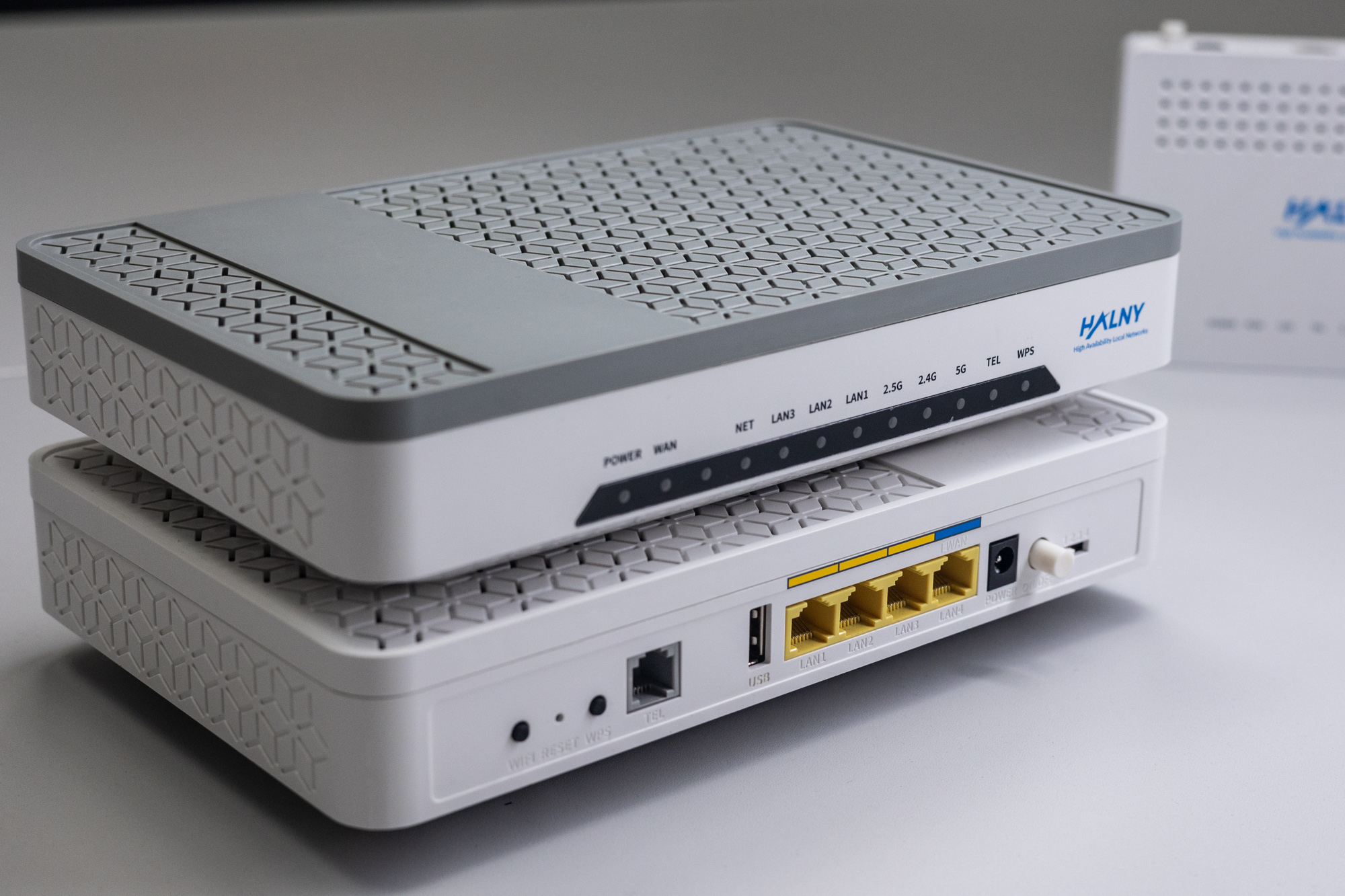
HALNy Integration
Supported SFU service scenarios
Attention: Before configuring ONT you must change vendor serial number!
- Log in to ONT via LAN: 192.168.33.1/cgi-bin/vendor-support.asp.
- Change Vendor to ZHONE ZNTS
- Apply configuration, ONT will reboot
More information regarding ONT vendor serial number change can be found here
1. ONT Configuration (Internet, IPTV)

1. Create DBA profile
Zhone# new gpon-traffic-profile dba-enabled = true dba-fixed-us-ubr-bw = 1024 dba-max-us-bw = 102400 12. Check unregistered ONTs
Zhone# gpononu show
Processing list of 256
This command may take several minutes to complete.
Do you want to continue?  (yes or no) [no] yes
Free ONUs for slot 1 olt 1:
    1    2    3    4    5    6    7    8    9   10   11   12
   13   14   15   16   17   18   19   20   21   22   23   24
   25   26   27   28   29   30   31   32   33   34   35   36
   37   38   39   40   41   42   43   44   45   46   47   48
   49   50   51   52   53   54   55   56   57   58   59   60
   61   62   63   64
Discovered serial numbers for slot 1 olt 1:
sernoID   Vendor  Serial Number     sernoID   Vendor  Serial Number
    1      ZNTS    032FC351             2      ZNTS    08604710
    3      ZNTS    03361173
3. Register ONT on GPON
Zhone# onu set SLOT/OLT-ID/ONT-ID SERNO-ID meprof INTERNAL-ME
ex. Zhone# onu set 1/2/16 2 meprof zhone-2424
4. Disable ONT auto-configuration
Zhone# gpononu auto-cfg disable SLOT/OLT-ID/ONT-ID
ex. Zhone# gpononu auto-cfg disable 1/2/16
5. Configure ONT bridge services
#NET
Zhone# bridge add SHELF/SLOT/OLT-ID/ONT-ID/gpononu gem GEM gtp GTP-ID downlink vlan VID tagged cos COS rg
ex. Zhone# bridge add 1/1/2/16/gpononu gem 516 gtp 1 downlink vlan 100 tagged cos 0 eth 1
Zhone# bridge add 1/1/2/16/gpononu gem 516 gtp 1 downlink vlan 100 tagged cos 0 eth 2

#IPTV
Zhone# bridge add SHELF/SLOT/OLT-ID/ONT-ID/gpononu gem GEM gtp GTP-ID downlink vlan VID tagged video ACL-ID/GROUP-NUM cos COS rg
ex. Zhone# bridge add 1/1/2/16/gpononu gem 716 gtp 1 downlink vlan 200 tagged video 0/20 cos 4 eth 3
Zhone# bridge add 1/1/2/16/gpononu gem 716 gtp 1 downlink vlan 200 tagged video 0/20 cos 4 eth 4
2. ONT Configuration (Internet, IPTV, VoIP)
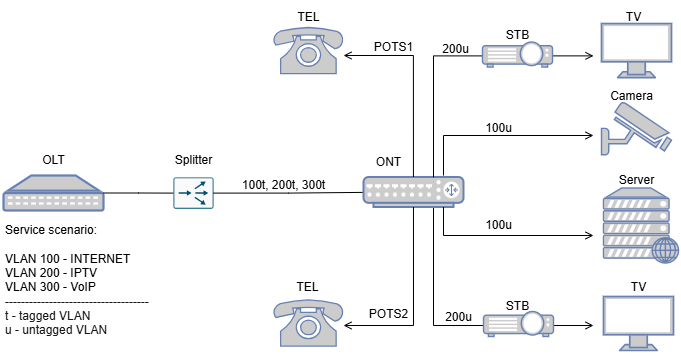
1. Create DBA profile
Zhone# new gpon-traffic-profile dba-enabled = true dba-fixed-us-ubr-bw = 1024 dba-max-us-bw = 102400 12. Check unregistered ONTs
Zhone# gpononu show
Processing list of 256
This command may take several minutes to complete.
Do you want to continue?  (yes or no) [no] yes
Free ONUs for slot 1 olt 1:
    1    2    3    4    5    6    7    8    9   10   11   12
   13   14   15   16   17   18   19   20   21   22   23   24
   25   26   27   28   29   30   31   32   33   34   35   36
   37   38   39   40   41   42   43   44   45   46   47   48
   49   50   51   52   53   54   55   56   57   58   59   60
   61   62   63   64
Discovered serial numbers for slot 1 olt 1:
sernoID   Vendor  Serial Number     sernoID   Vendor  Serial Number
    1      ZNTS    032FC351             2      ZNTS    5AFF64B0
    3      ZNTS    03361173
3. Register ONT on GPON
Zhone# onu set SLOT/OLT-ID/ONT-ID SERNO-ID meprof INTERNAL-ME
ex. Zhone# onu set 1/2/17 2 meprof zhone-2424
4. Disable ONT auto-configuration
Zhone# gpononu auto-cfg disable SLOT/OLT-ID/ONT-ID
ex. Zhone# gpononu auto-cfg disable 1/2/17
5. Configure ONT bridge services
#NET
Zhone# bridge add SHELF/SLOT/OLT-ID/ONT-ID/gpononu gem GEM gtp GTP-ID downlink vlan VID tagged cos COS rg
ex. Zhone# bridge add 1/1/2/17/gpononu gem 517 gtp 1 downlink vlan 100 tagged cos 0 eth 1
ex. Zhone# bridge add 1/1/2/17/gpononu gem 517 gtp 1 downlink vlan 100 tagged cos 0 eth 2


#IPTV
Zhone# bridge add SHELF/SLOT/OLT-ID/ONT-ID/gpononu gem GEM gtp GTP-ID downlink vlan VID tagged video ACL-ID/GROUP-NUM cos COS rg
ex. Zhone# bridge add 1/1/2/17/gpononu gem 717 gtp 1 downlink vlan 200 tagged video 0/20 cos 4 eth 3
ex. Zhone# bridge add 1/1/2/17/gpononu gem 717 gtp 1 downlink vlan 200 tagged video 0/20 cos 4 eth 4
6. Configure ONT VoIP / IP-host 1 service
Zhone# bridge add 1/1/2/17/gpononu gem 917 gtp 1 downlink vlan 300 tagged sip7. Configure ONT VoIP service
new cpe-ip  1/1/2/17/gpononu/1
Please provide the following: [q]uit.
host-ip: ----------->  {0.0.0.0}:
ip-server-profile: ->  {1}:
....................
Save new record? [s]ave, [c]hange or [q]uit: s
New record saved.

new cpe-voip-subscriber  1/1/2/17/gpononu/1
Please provide the following: [q]uit.
admin-state: ----------->  {up}:
dial-number: ----------->  {}: 9041
display-name: ---------->  {}: 9041
impedance: ------------->  {ohm600}:
rx-gain: --------------->  {0}:
tx-gain: --------------->  {0}:
transmission-path: ----->  {fulltimeonhookxmit}:
signalling-code: ------->  {loopstart}:
voip-server-profile: --->  {0}: 13
voip-features-profile: ->  {1}:
voip-media-profile: ---->  {1}:
phone-follows-wan: ----->  {disabled}:
password: -------------->  {** private **}: 123456
user-name: ------------->  {}: 9041
description: ----------->  {}: 9041
....................
Save new record? [s]ave, [c]hange or [q]uit: s
New record saved.

new cpe-ip  1/1/2/17/gpononu/2
Please provide the following: [q]uit.
host-ip: ----------->  {0.0.0.0}:
ip-server-profile: ->  {1}:
....................
Save new record? [s]ave, [c]hange or [q]uit: s
New record saved.

new cpe-voip-subscriber  1/1/2/17/gpononu/2
Please provide the following: [q]uit.
admin-state: ----------->  {up}:
dial-number: ----------->  {}: 9011
display-name: ---------->  {}: 9011
impedance: ------------->  {ohm600}:
rx-gain: --------------->  {0}:
tx-gain: --------------->  {0}:
transmission-path: ----->  {fulltimeonhookxmit}:
signalling-code: ------->  {loopstart}:
voip-server-profile: --->  {0}: 13
voip-features-profile: ->  {1}:
voip-media-profile: ---->  {1}:
phone-follows-wan: ----->  {disabled}:
password: -------------->  {** private **}: 123456
user-name: ------------->  {}: 9011
description: ----------->  {}: 9011
....................
Save new record? [s]ave, [c]hange or [q]uit: s
New record saved.
8. Verify ONT ip-host 1 IP address
Zhone# bridge show 1/1/2/17/gpononu vlan 300
         Orig
Type     VLAN/SLAN  VLAN/SLAN      Physical                  Bridge                              St  Table Data
---------------------------------------------------------------------------------------------------------------------
dwn                 Tagged  300    1/1/2/17/gpononu           1-1-2-917-gponport-300/bridge       UP  D e0:5a:9f:ff:64:b0
                                                                                                     D 172.17.60.27
                                                                                                     D fe80::e25a:9fff:feff:64b0
1 Bridge Interfaces displayed
3. ONT Configuration (TRANSPARENT mode)

1. Create DBA profile
Zhone# new gpon-traffic-profile dba-enabled = true dba-fixed-us-ubr-bw = 1024 dba-max-us-bw = 102400 12. Check unregistered ONTs
Zhone# gpononu show
Processing list of 256
This command may take several minutes to complete.
Do you want to continue?  (yes or no) [no] yes
Free ONUs for slot 1 olt 1:
    1    2    3    4    5    6    7    8    9   10   11   12
   13   14   15   16   17   18   19   20   21   22   23   24
   25   26   27   28   29   30   31   32   33   34   35   36
   37   38   39   40   41   42   43   44   45   46   47   48
   49   50   51   52   53   54   55   56   57   58   59   60
   61   62   63   64
Discovered serial numbers for slot 1 olt 1:
sernoID   Vendor  Serial Number     sernoID   Vendor  Serial Number
    1      ZNTS    032FC351             2      ZNTS    5AFF64B0
    3      ZNTS    03361173
3. Register ONT on GPON
Zhone# onu set SLOT/OLT-ID/ONT-ID SERNO-ID meprof INTERNAL-ME
ex. Zhone# onu set 1/2/17 2 meprof zhone-2424
4. Disable ONT auto-configuration
Zhone# gpononu auto-cfg disable SLOT/OLT-ID/ONT-ID
ex. Zhone# gpononu auto-cfg disable 1/2/17
5. Configure ONT bridge services
bridge add 1/1/2/17/gpononu gem 517 gtp 1024000  downlink vlan 100 tagged eth 1 uni-vlan 100
bridge add 1/1/2/17/gpononu gem 717 gtp 1024000  downlink vlan 200 tagged video 0/20 eth 1 uni-vlan 200
bridge add 1/1/2/17/gpononu gem 917 gtp 1024000  downlink vlan 300 tagged eth 1 uni-vlan 300

bridge add 1/1/2/17/gpononu gem 517 gtp 1024000  downlink vlan 100 tagged eth 2 uni-vlan 100
bridge add 1/1/2/17/gpononu gem 717 gtp 1024000  downlink vlan 200 tagged video 0/20 eth 2 uni-vlan 200
bridge add 1/1/2/17/gpononu gem 917 gtp 1024000  downlink vlan 300 tagged eth 2 uni-vlan 300

bridge add 1/1/2/17/gpononu gem 517 gtp 1024000  downlink vlan 100 tagged eth 3 uni-vlan 100
bridge add 1/1/2/17/gpononu gem 717 gtp 1024000  downlink vlan 200 tagged video 0/20 eth 2 uni-vlan 200
bridge add 1/1/2/17/gpononu gem 917 gtp 1024000  downlink vlan 300 tagged eth 3 uni-vlan 300

bridge add 1/1/2/17/gpononu gem 517 gtp 1024000  downlink vlan 100 tagged eth 4 uni-vlan 100
bridge add 1/1/2/17/gpononu gem 717 gtp 1024000  downlink vlan 200 tagged video 0/20 eth 2 uni-vlan 200
bridge add 1/1/2/17/gpononu gem 917 gtp 1024000  downlink vlan 300 tagged eth 4 uni-vlan 300
4. ONT Configuration (VLAN Translation – rBSA)

1. Create DBA profile
Zhone# new gpon-traffic-profile dba-enabled = true dba-fixed-us-ubr-bw = 1024 dba-max-us-bw = 102400 12. Check unregistered ONTs
Zhone# gpononu show
Processing list of 256
This command may take several minutes to complete.
Do you want to continue?  (yes or no) [no] yes
Free ONUs for slot 1 olt 1:
    1    2    3    4    5    6    7    8    9   10   11   12
   13   14   15   16   17   18   19   20   21   22   23   24
   25   26   27   28   29   30   31   32   33   34   35   36
   37   38   39   40   41   42   43   44   45   46   47   48
   49   50   51   52   53   54   55   56   57   58   59   60
   61   62   63   64
Discovered serial numbers for slot 1 olt 1:
sernoID   Vendor  Serial Number     sernoID   Vendor  Serial Number
    1      ZNTS    032FC351             2      ZNTS    5AFF64B0
    3      ZNTS    03361173
3. Register ONT on GPON
Zhone# onu set SLOT/OLT-ID/ONT-ID SERNO-ID meprof INTERNAL-ME
ex. Zhone# onu set 1/2/17 2 meprof zhone-2424
4. Disable ONT auto-configuration
Zhone# gpononu auto-cfg disable SLOT/OLT-ID/ONT-ID
ex. Zhone# gpononu auto-cfg disable 1/2/17
5. Configure ONT bridge services
bridge add 1/1/2/17/gpononu gem 517 gtp 1024000  downlink vlan 100 tagged eth 1 uni-vlan 35
bridge add 1/1/2/17/gpononu gem 717 gtp 1024000  downlink vlan 200 tagged video 0/20 eth 1 uni-vlan 838
bridge add 1/1/2/17/gpononu gem 917 gtp 1024000  downlink vlan 300 tagged eth 1 uni-vlan 839

bridge add 1/1/2/17/gpononu gem 517 gtp 1024000  downlink vlan 100 tagged eth 2 uni-vlan 35
bridge add 1/1/2/17/gpononu gem 717 gtp 1024000  downlink vlan 200 tagged video 0/20 eth 2 uni-vlan 838
bridge add 1/1/2/17/gpononu gem 917 gtp 1024000  downlink vlan 300 tagged eth 2 uni-vlan 839

bridge add 1/1/2/17/gpononu gem 517 gtp 1024000  downlink vlan 100 tagged eth 3 uni-vlan 35
bridge add 1/1/2/17/gpononu gem 717 gtp 1024000  downlink vlan 200 tagged video 0/20 eth 3 uni-vlan 838
bridge add 1/1/2/17/gpononu gem 917 gtp 1024000  downlink vlan 300 tagged eth 3 uni-vlan 839

bridge add 1/1/2/17/gpononu gem 517 gtp 1024000  downlink vlan 100 tagged eth 4 uni-vlan 35
bridge add 1/1/2/17/gpononu gem 717 gtp 1024000  downlink vlan 200 tagged video 0/20 eth 4 uni-vlan 838
bridge add 1/1/2/17/gpononu gem 917 gtp 1024000  downlink vlan 300 tagged eth 4 uni-vlan 839
ONT Managment
Note: Most provisioning and upgrade options below require ONT to have a valid IP Host setup. For detailed information regarding IP Host click here.
| Method | Configuration | Upgrade |
| Rest API V2 | [Example] | – |
| XML Provisioning [DHCP 66/67, WEB] | [Example] | – |
| OTT | – | [Example] |
| OLT CLI | – | [Example] |
| TR-069 [DHCP 43] | [Example] | [Example] |
| WEB | [Example] | [Example] |
| Found something we can improve? Let us know at support@halny.com |
