Tested with ONT HALNy HL-1GE/2, HL-1GC, HL-1GR, HL-4G, HL-4GMV
Supported on version V2.0.10 or above
Tested with ONT HALNy HL-1B, HL-2BV, HL-4G2
Supported on version V4.0.4 or above
Tested with ONT HALNy HL-4GMV2/3/4, HL-4GQV / HL-4GQVS / HL-4GQVS2, HL-4GXV / HL-4GXV-F
Supported on Version: V3.0.3 or above
Tested with ONT HALNy HL-4BX3V-F, HL-4GX3VR
Supported on Version: V5.0.9 or above
Revision
1
1. Basics
TR-069 defines the application layer protocol for remote management of CPE. It uses CWMP (CPE WAN Management Protocol) to provide functions for auto-configuration, software module management, performance management, diagnostic, etc.
Principle of operation:
communication between client(CPE), and server (ACS)
communication starts always from client – in our case ONT device
communication using the CWMP protocol
server can only inform CPE that he has some new config but CPE is obligated to start session
CPE configuration is based on parameters and their:
values
attributes
How to start
Install and configure ACS Server (should be accessible from ONT through iphost1 interface)
Configure ONT on OLT, make sure iphost1 interface is properly configured
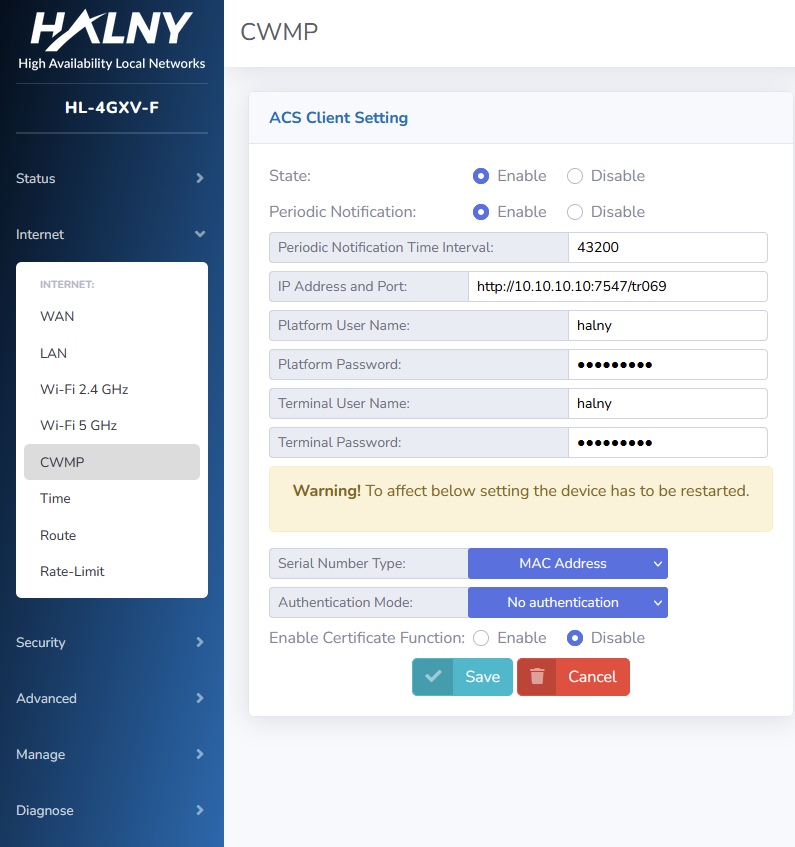
Send ACS Login information to ONT via OMCI or set it by Web interface
ONT should show on ACS Server
You can start to configure, provision and monitor ONT via TR-069
2. TR-069 data model
Below You can check how our TR-069 data model for ONT looks like. Because TR-069 data nodes define by broadband forum do not provide management for all functionality of our ONTs, we create own nodes, based on requirements provides by the broadband forum. You can easily check nodes that were defined by us – our node’s names start with X_HALNY_ or X_CT-COM_ prefix:
Need extra nodes? Let us know — we can create them for you upon request.
3. ACS Login Information config via Web
4. ACS Login Information config via OMCI
DASAN
 onu-profile HGU-TR069 create
  traffic-profile HGU
  mgmt-mode mode tr-069
  mgmt-mode tr-069 uri http://IP:PORT
  mgmt-mode tr-069 access id USERNAME password PASSWD
  apply
HUAWEI
MA5683T(config)# ont tr069-server-profile add profile-id ID url http://IP:PORT user USERNAME PASSWD
MA5683T(config-if-gpon-0/0)#ont tr069-server-config PORT ONUID profile-id ID
configure pon
auth-sec-prof 1 name tr-069
  user-name USERNAME
  password plain:PASSWORD
exit

uri-prof 1 name tr-069
  address http://IP:PORT/
exit

sec-uri-profile 1 name tr-069 uri-prof 1
  auth-securi-prof 1
exit

configure tr069serv
ont 1/1/1/2/10/10/1
  securi-prof 1
  admin-state up
exit
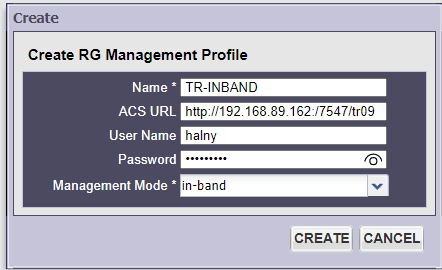
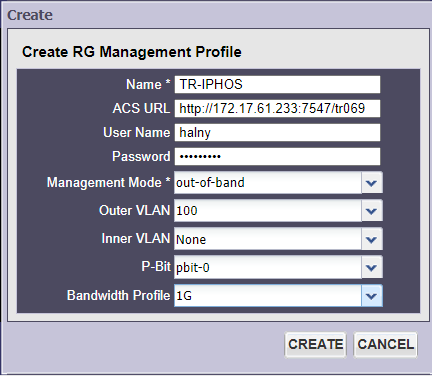
Calix
IN-BAND – enable TR-069 on WAN1 – (RG service for Internet )
OUT-OF-BAND – different VLAN than on WAN1(RG) – in this case, tr-069 is enabled on WAN0 – IP-HOST 0, with different VLAN defined in RG management-profile (in this example – VLAN 100)