
Have a Question?
[ALTICE] OLT1T0 OLT Integration with HALNy SFU 1 LAN
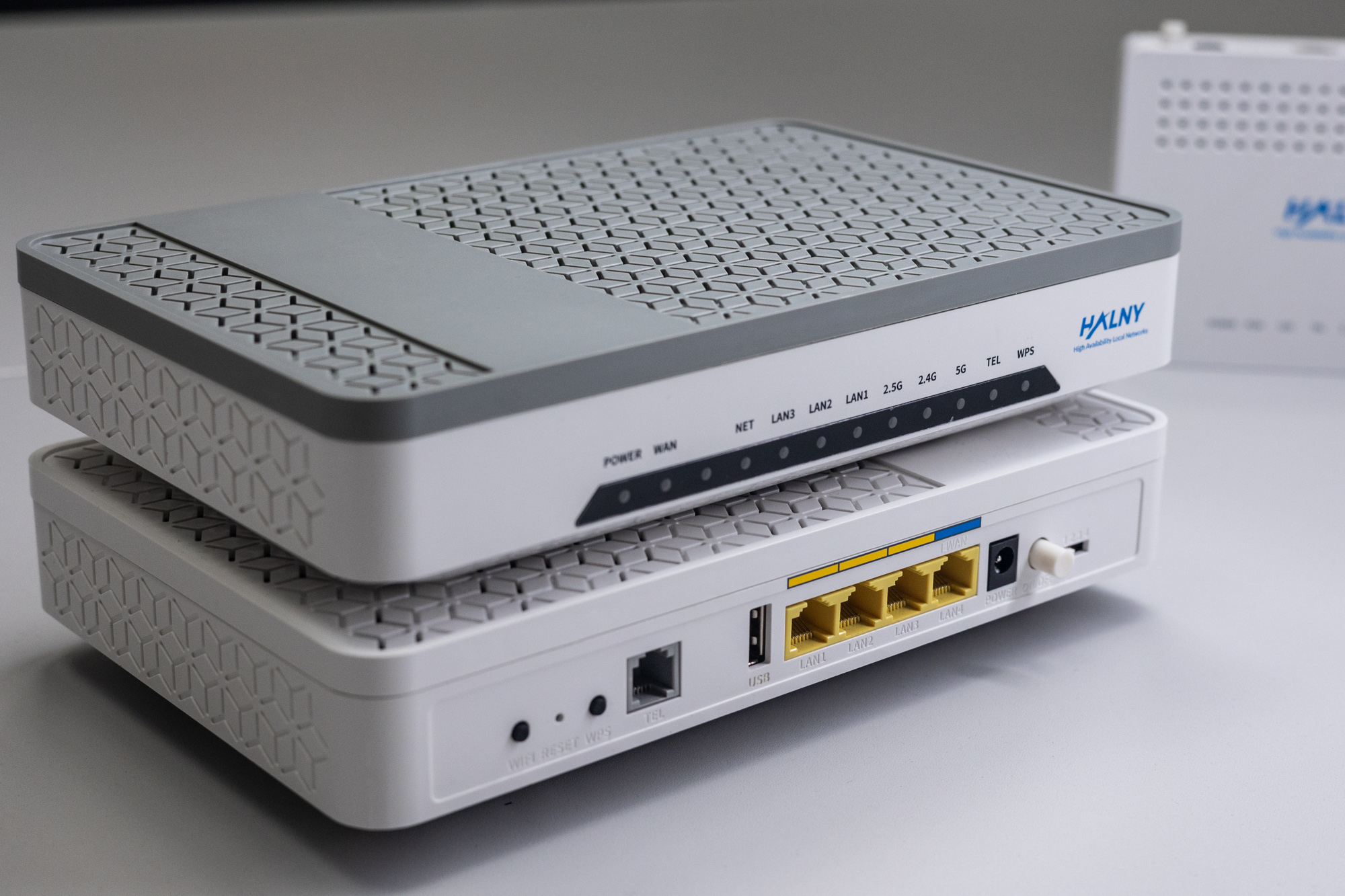
HALNy Integration
Supported SFU service scenarios
1. ONT configuration (Access mode, only INTERNET)

Attention: Following configuration example is based on the HL-1B model, which features 1 LAN port. Adjust the configuration/services as needed to suit your ONT model.
- Create ONT profile on OLT:
Click on the image to enlarge it.
(CONFIGURATIONS > GENERIC > EQUIPMENT MODELS > CREATE MODEL)
- NAME – name of the ONT profile (e.g HL-1B)
- VENDOR – HALNy
- MODEL – model of the ONT
- ADMINISTRATIVE STATE – switch to IN SERVICE
- ETH – put exact number of ETH ports of the ONT
- PON – 1
- RF – in case ONT is equipped with RF port
- VoIP - put exact number of POTS ports of the ONT
- VEIP – 1 – for MGMT IP host purposes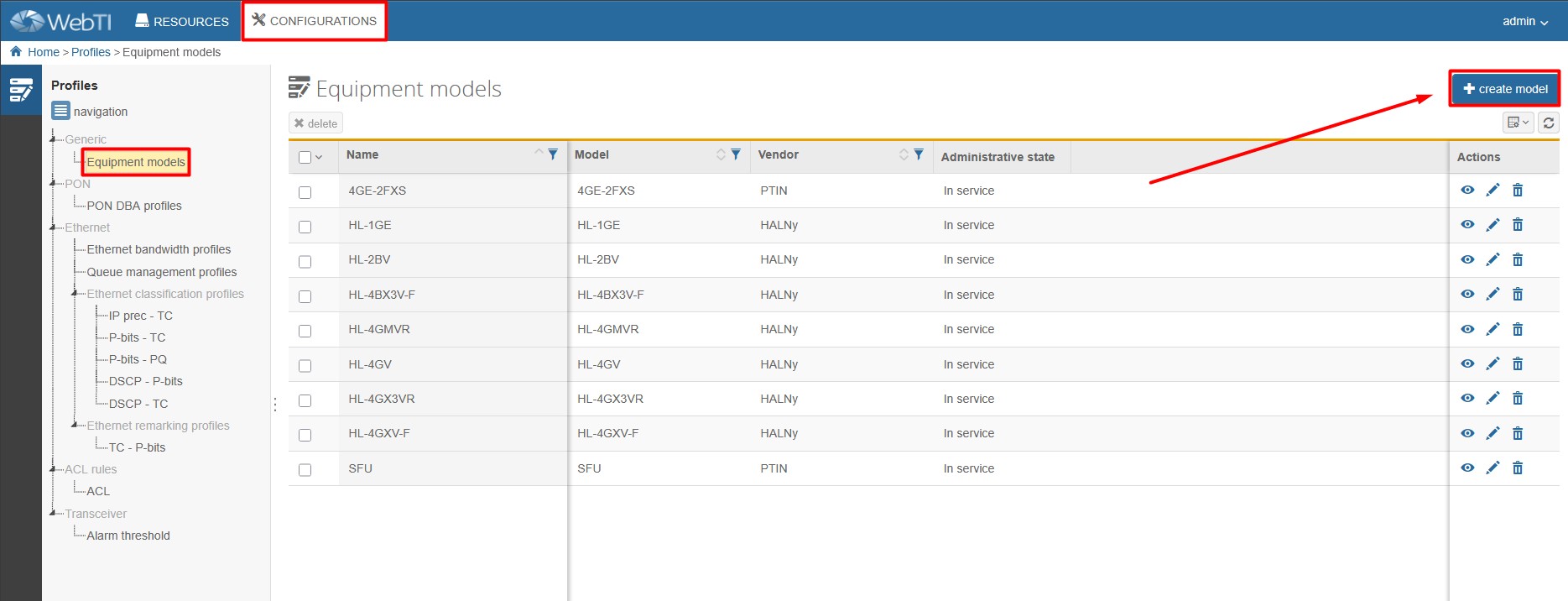
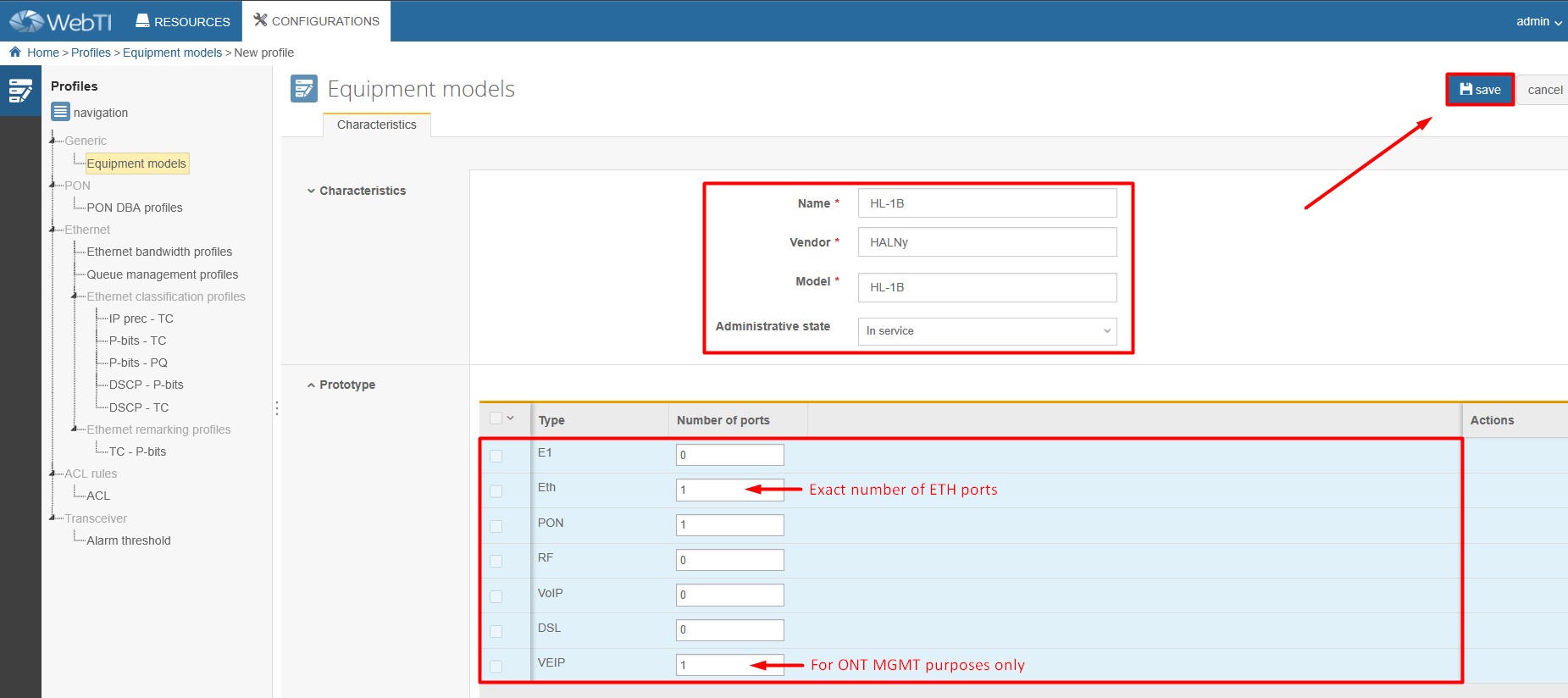
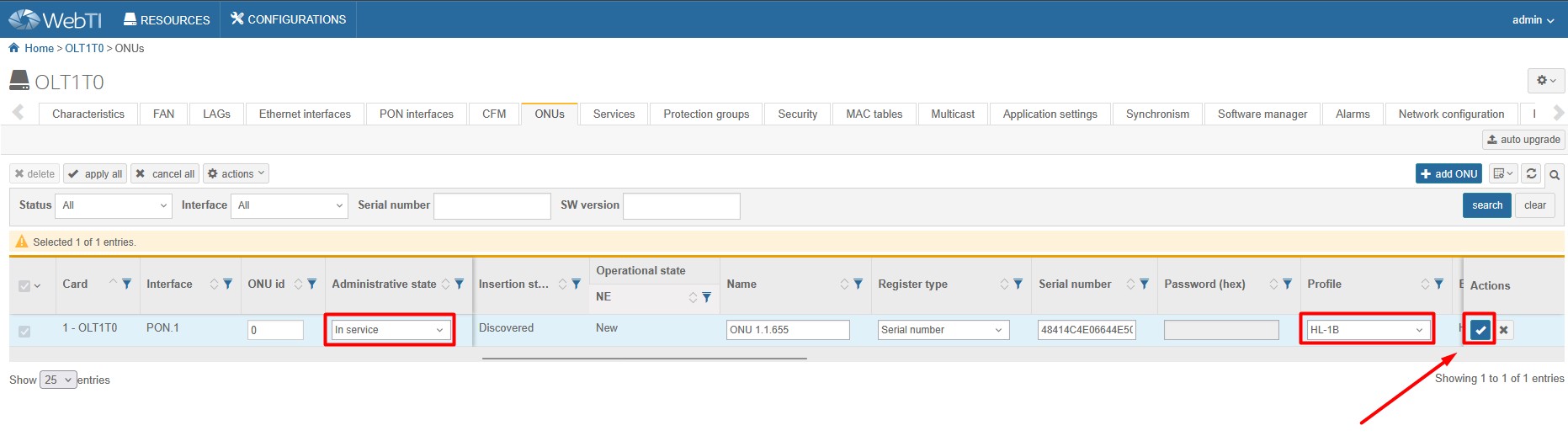
2. Add ONT to GPON port (RESOURCES > ONUs)
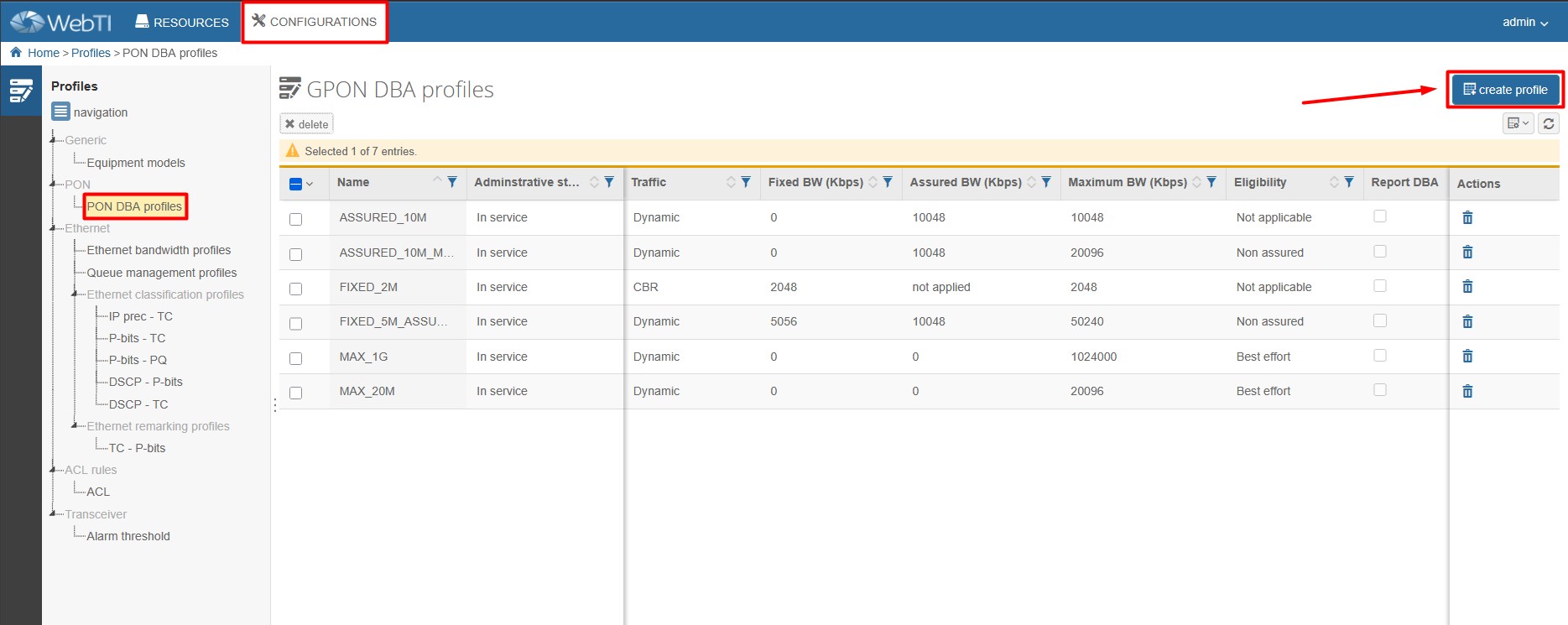
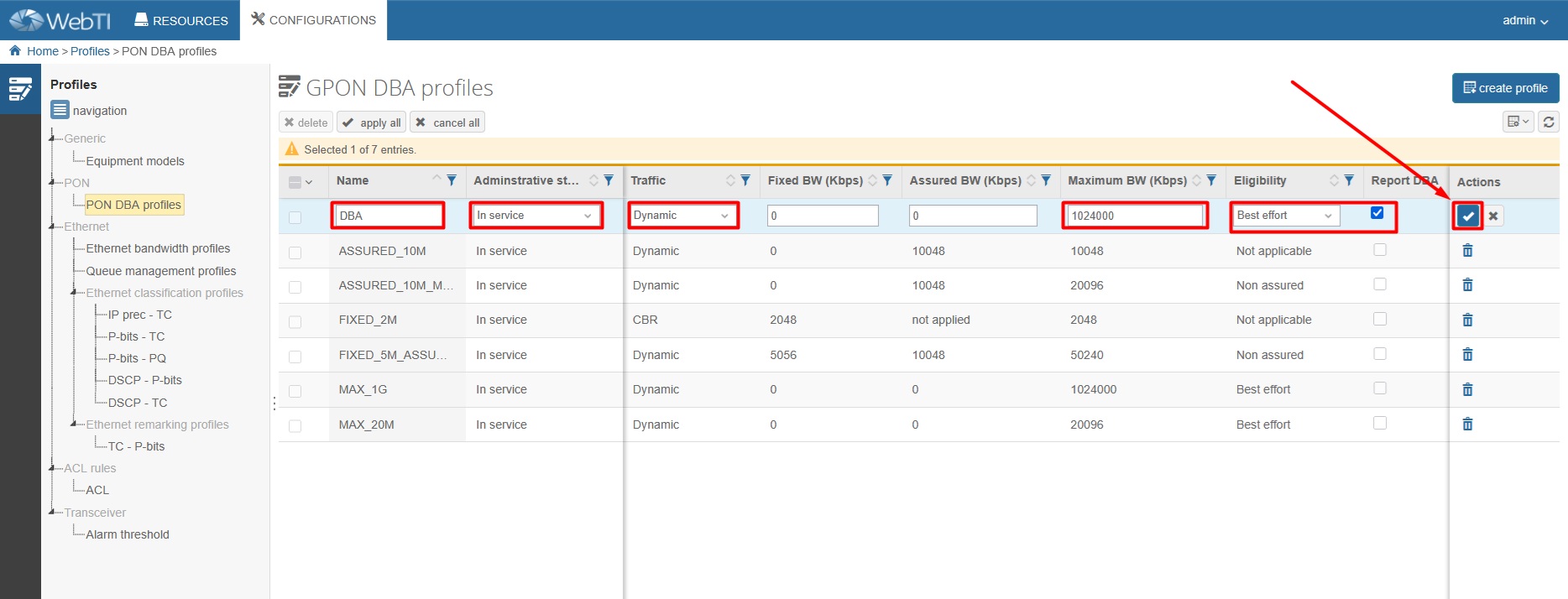
3. Create DBA profile (CONFIGURATIONS > PON > PON DBA PROFILES)
4. Create Ethernet bandwidth profile (CONFIGURATIONS > ETHERNET > ETHERNET BANDWIDTH PROFILE)
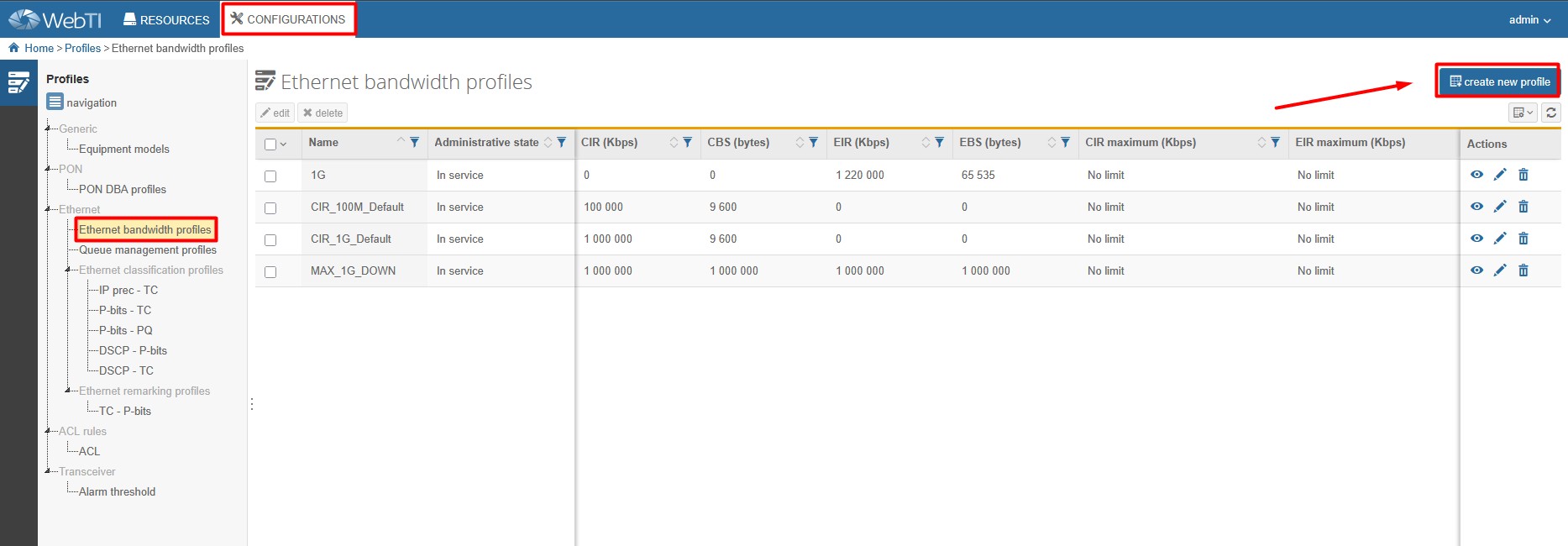
NOTE: HL-1B has one ETH 2.5G port, so there is need to setup ethernet bandwidth profile with higher EIR value than in profile named *1G* to match ETH 2.5G bandwidth.
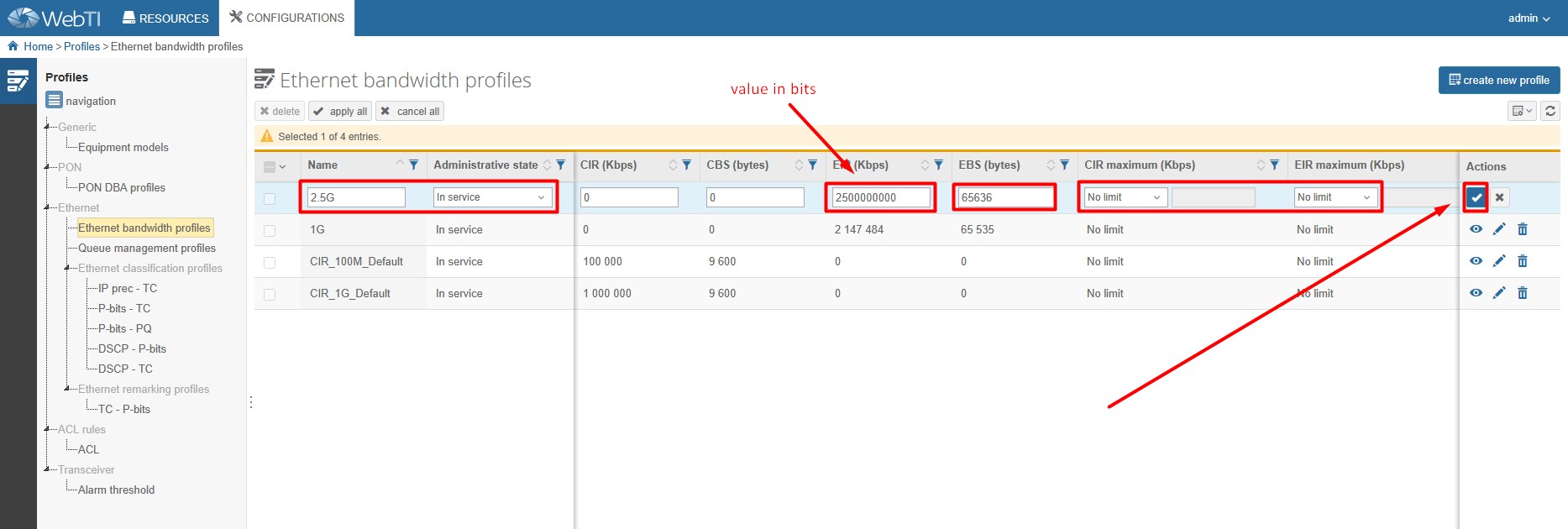
5. Add Network services (VLANs) you need (RESOURCES > SERVICES > NETWORK SERVICES).
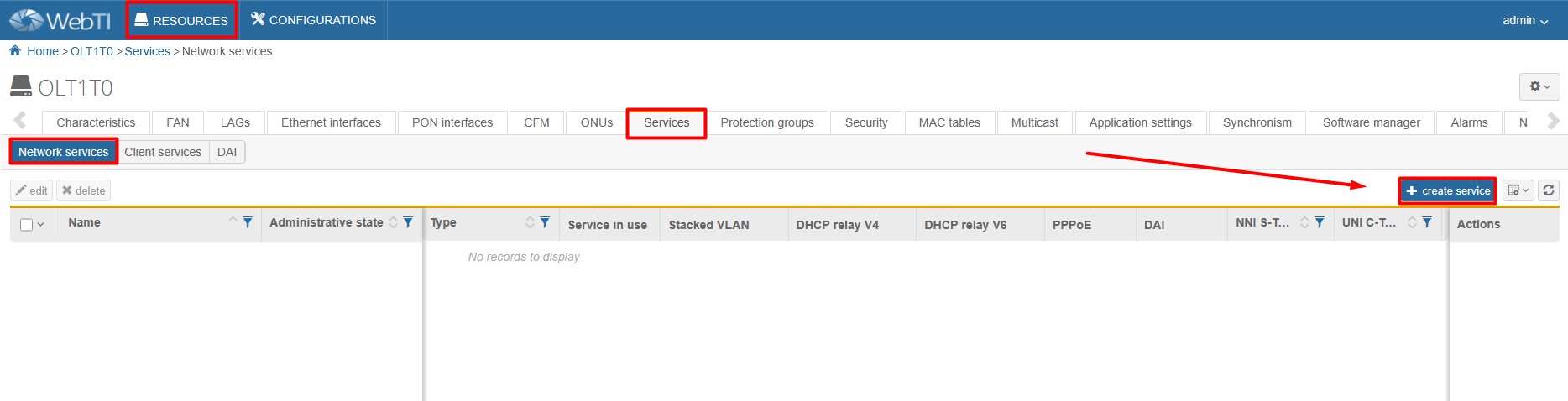
INTERNET – VLAN 100
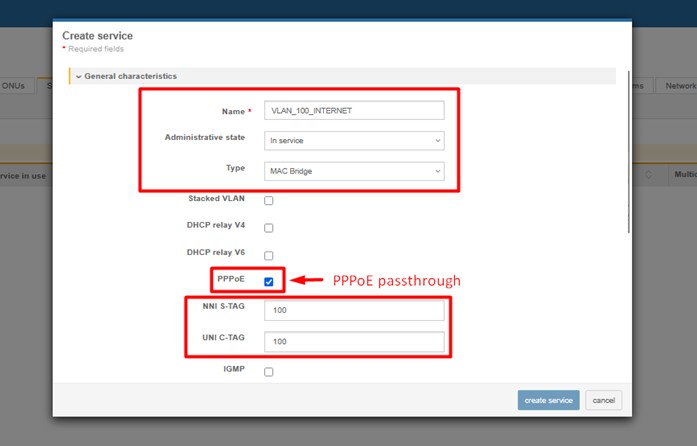
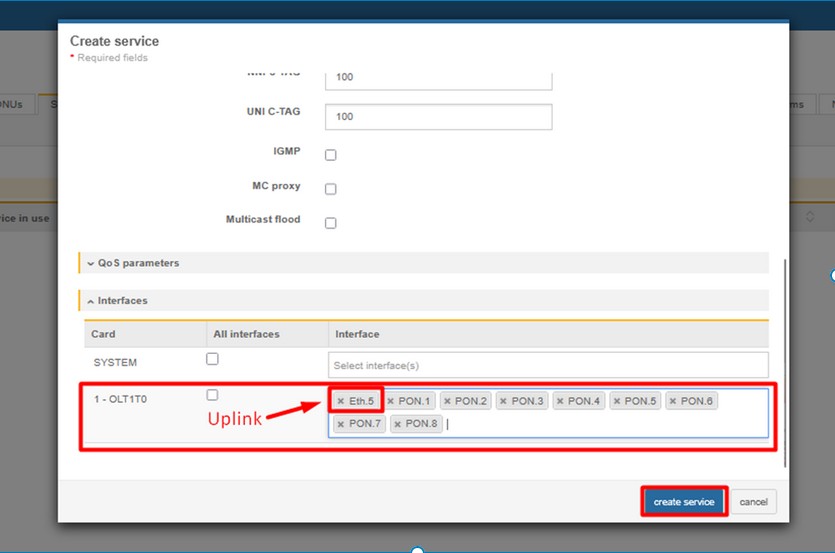
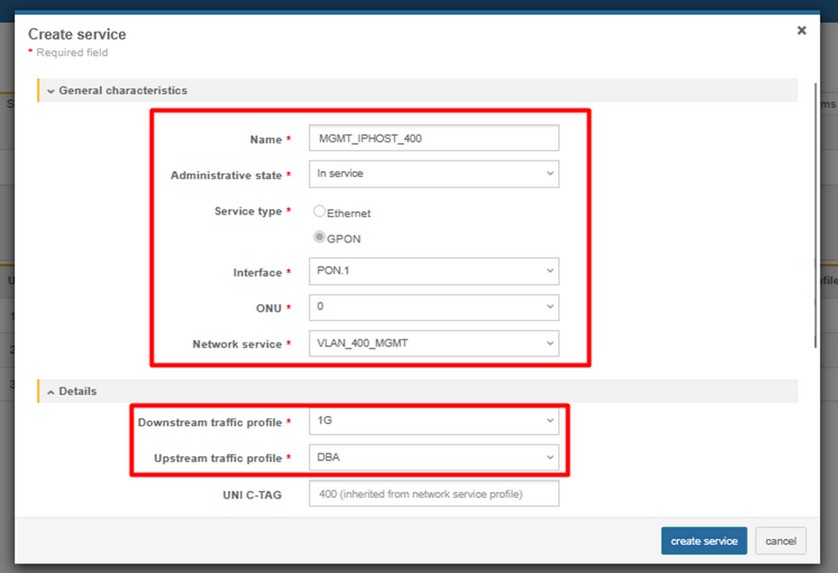
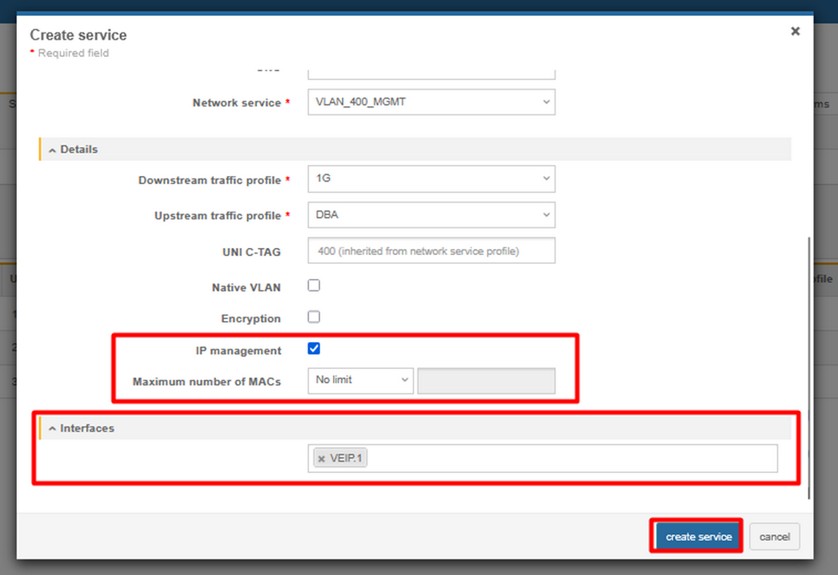
MGMT – IP host – VLAN 400
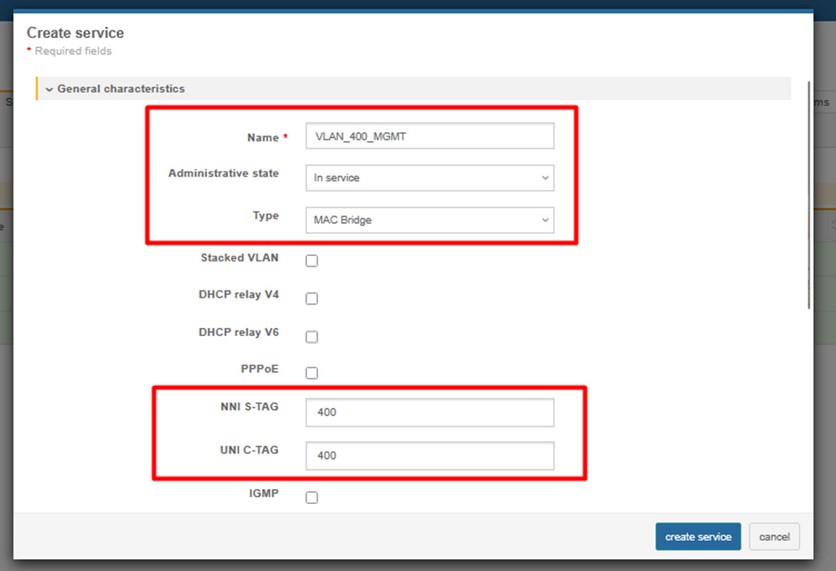
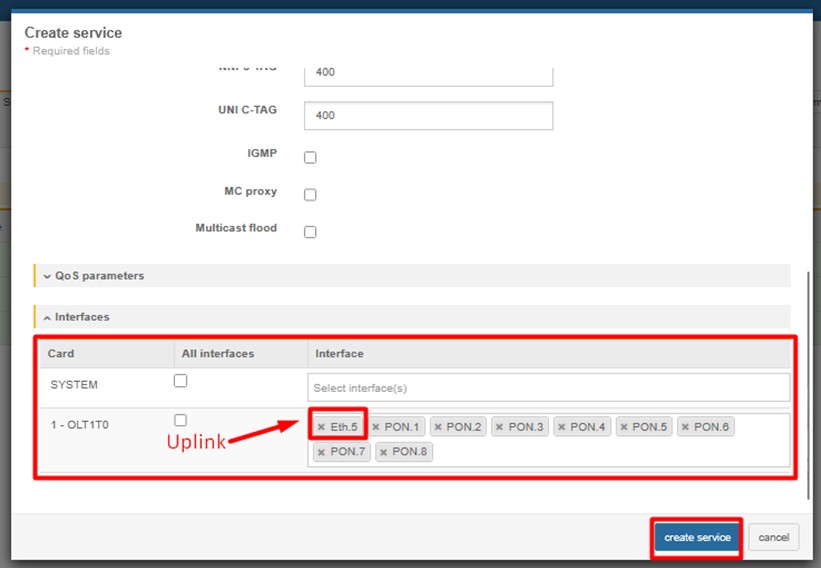
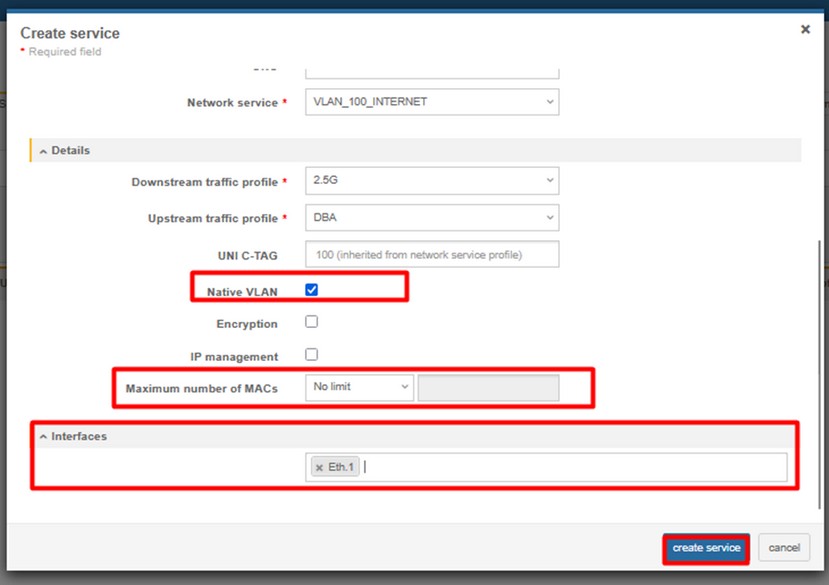
6. Add Client service to your ONU. (RESOURCES > SERVICES > CLIENT SERVICES)
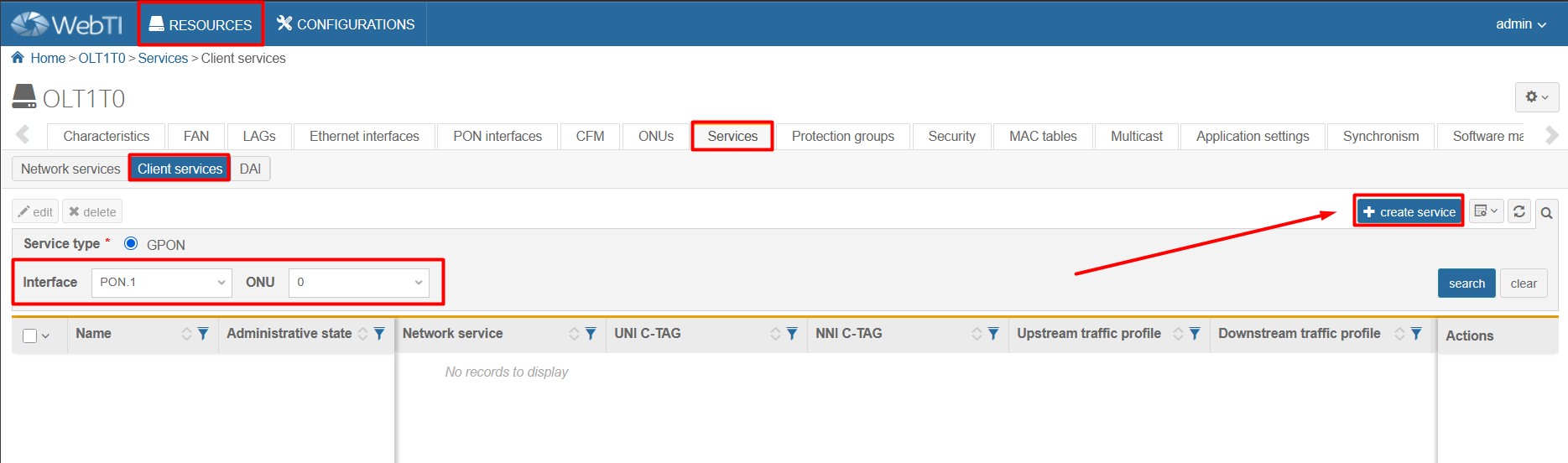
INTERNET (VLAN 100)
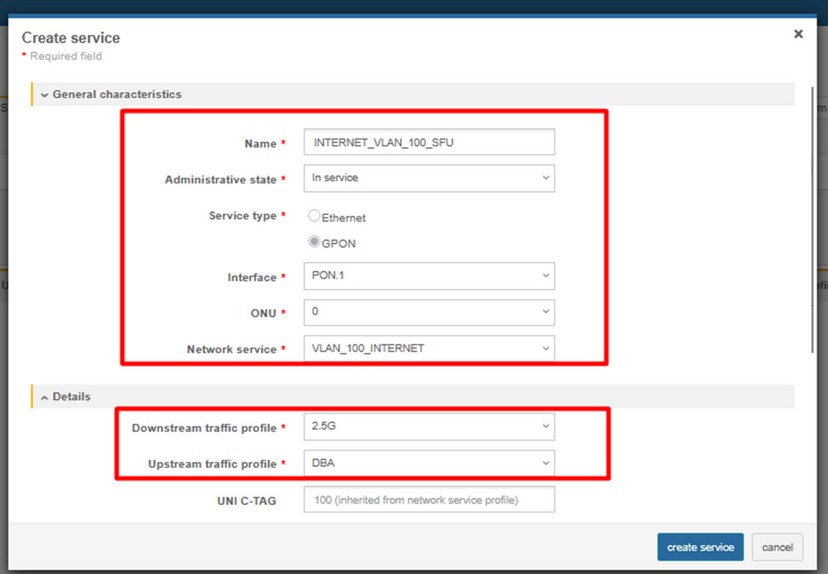
MGMT (VLAN 400)
2. ONT configuration (access mode ONLY IPTV)

1.Create ONT profile on OLT :
Click on the image to enlarge it.
(CONFIGURATIONS > GENERIC > EQUIPMENT MODELS > CREATE MODEL)
- NAME – name of the ONT profile (e.g HL-1B)
- VENDOR – HALNy
- MODEL – model of the ONT
- ADMINISTRATIVE STATE – switch to IN SERVICE
- ETH – put exact number of ETH ports of the ONT
- PON – 1
- RF – in case ONT is equipped with RF port
- VoIP - put exact number of POTS ports of the ONT
- VEIP – 1 – for MGMT IP host purposes
2. Add ONT to GPON port (RESOURCES > ONUs)
3. Create DBA profile (CONFIGURATIONS > PON > PON DBA PROFILES)
4. Create Ethernet bandwidth profile (CONFIGURATIONS > ETHERNET > ETHERNET BANDWIDTH PROFILE)
NOTE: HL-1B has one ETH 2.5G port, so there is need to setup ethernet bandwidth profile with higher EIR value than in profile named *1G* to match ETH 2.5G bandwidth.
5. Add Network services (VLANs) you need (RESOURCES > SERVICES > NETWORK SERVICES)
MULTICAST – VLAN 200
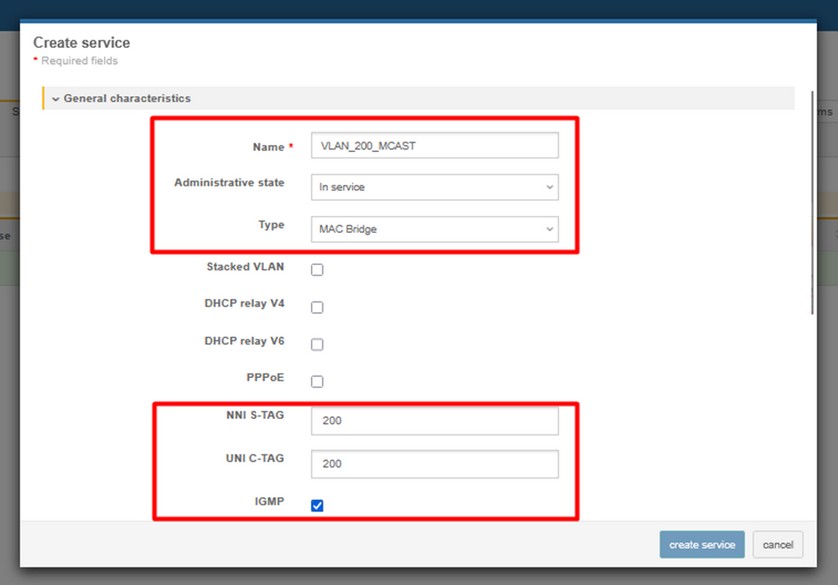
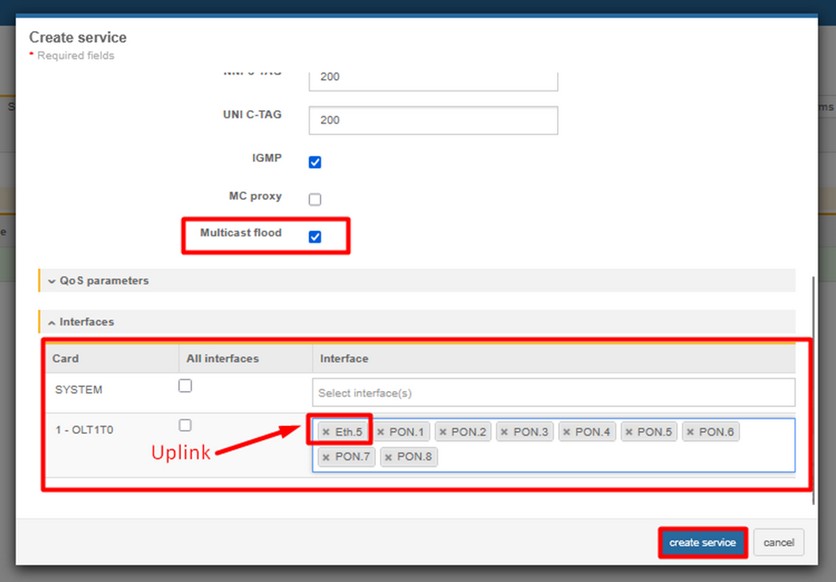
MGMT – IP host – VLAN 400
6. Add Client service to your ONU. (RESOURCES > SERVICES > CLIENT SERVICES)
IPTV (VLAN 200)
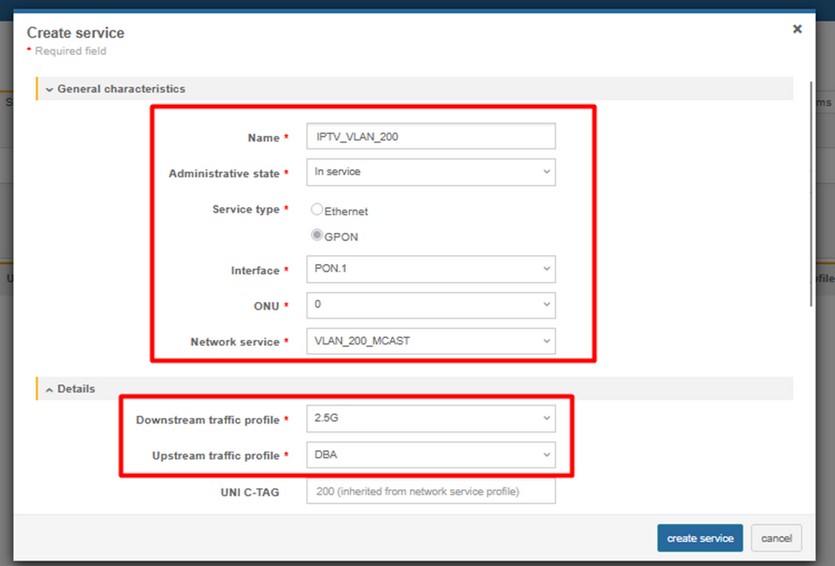
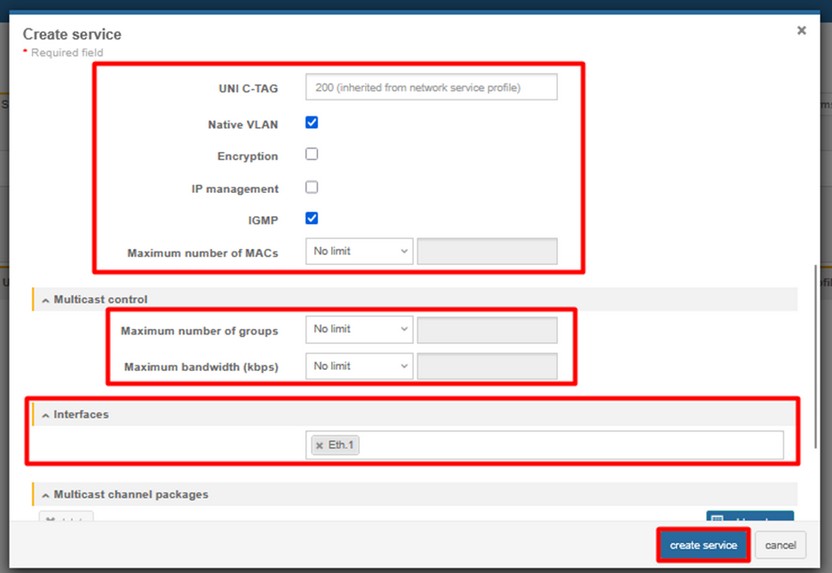
MGMT (VLAN 400)
3. ONT Configuration – TRANSPARENT MODE

1. Create ONT profile on OLT:
Click on the image to enlarge it.
(CONFIGURATIONS > GENERIC > EQUIPMENT MODELS > CREATE MODEL)
- NAME – name of the ONT profile (e.g HL-1B)
- VENDOR – HALNy
- MODEL – model of the ONT
- ADMINISTRATIVE STATE – switch to IN SERVICE
- ETH – put exact number of ETH ports of the ONT
- PON – 1
- RF – in case ONT is equipped with RF port
- VoIP - put exact number of POTS ports of the ONT
- VEIP – 1 – for MGMT IP host purposes
2. Add ONT to GPON port (RESOURCES > ONUs)
3. Create DBA profile (CONFIGURATIONS > PON > PON DBA PROFILES)
4. Create Ethernet bandwidth profile (CONFIGURATIONS > ETHERNET > ETHERNET BANDWIDTH PROFILE)
NOTE: HL-1B has one ETH 2.5G port, so there is need to setup ethernet bandwidth profile with higher EIR value than in profile named *1G* to match ETH 2.5G bandwidth.
5. Add Network services (VLANs) you need (RESOURCES > SERVICES > NETWORK SERVICES)
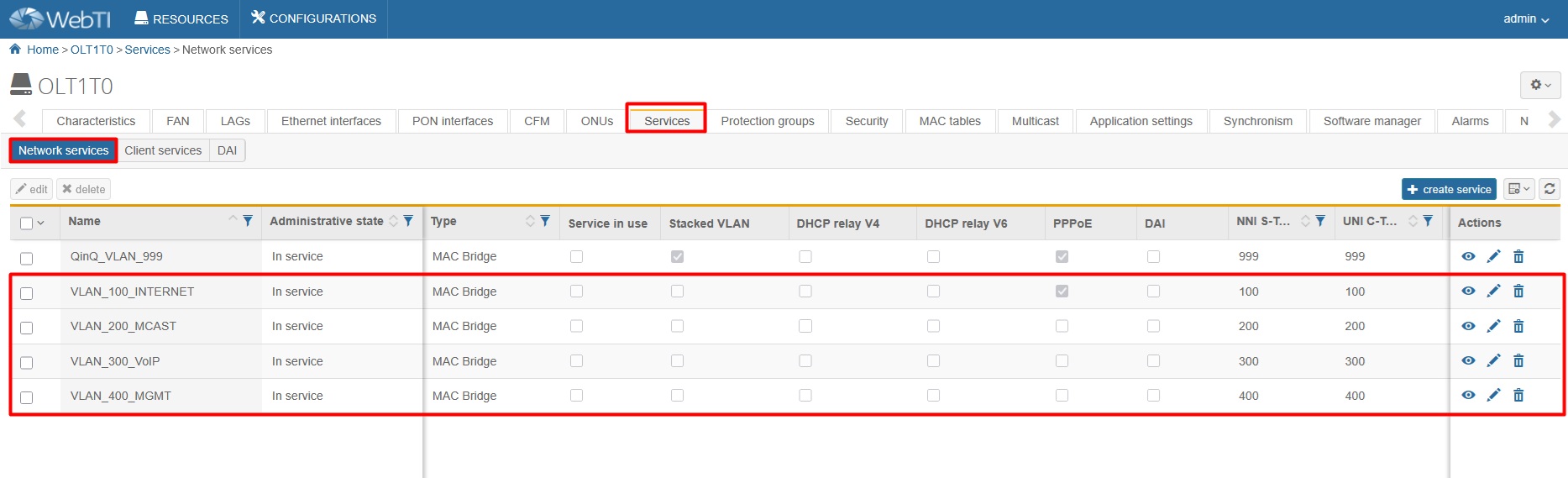
INTERNET – VLAN 100
MULTICAST – VLAN 200
VoIP – VLAN 300
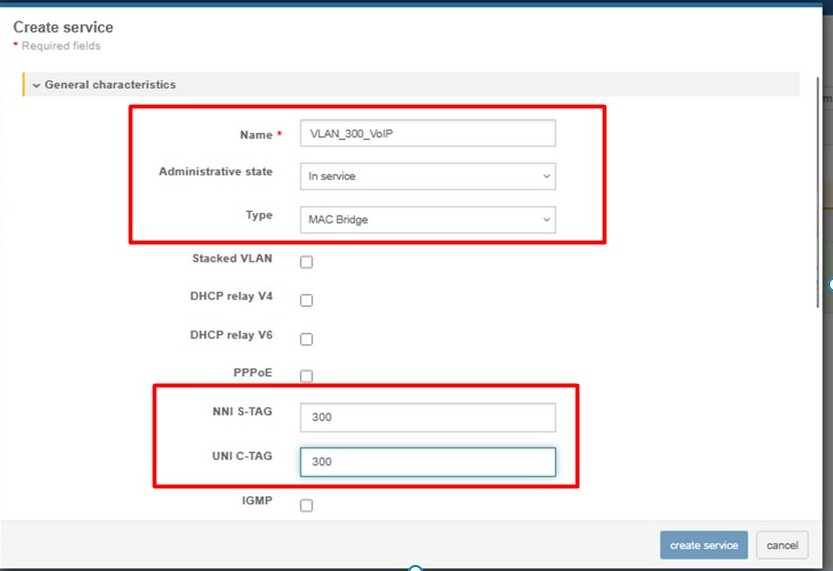
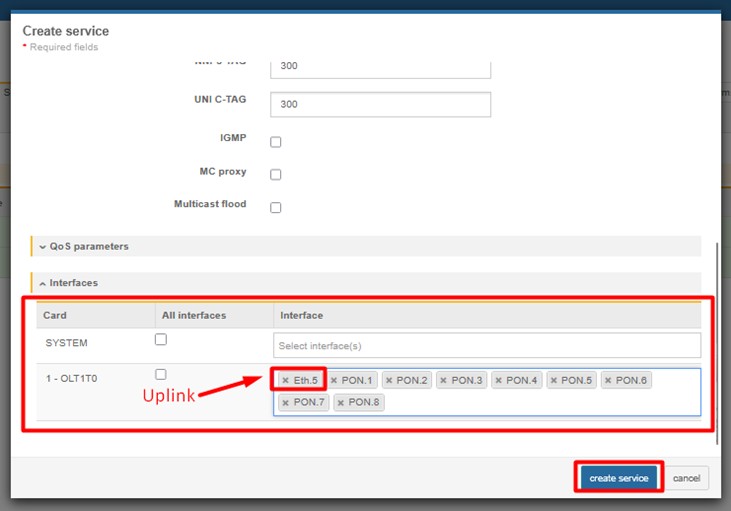
MGMT – IP host – VLAN 400
Final result of configured network services should look like below:
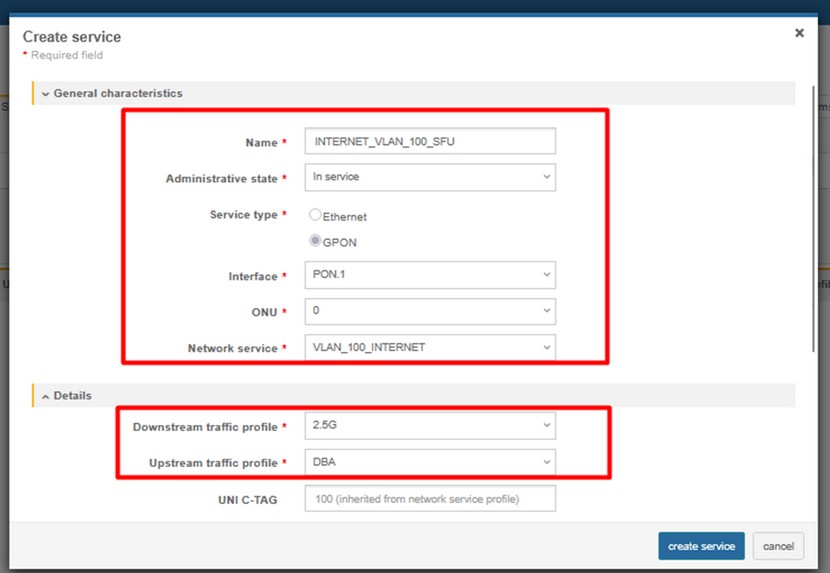
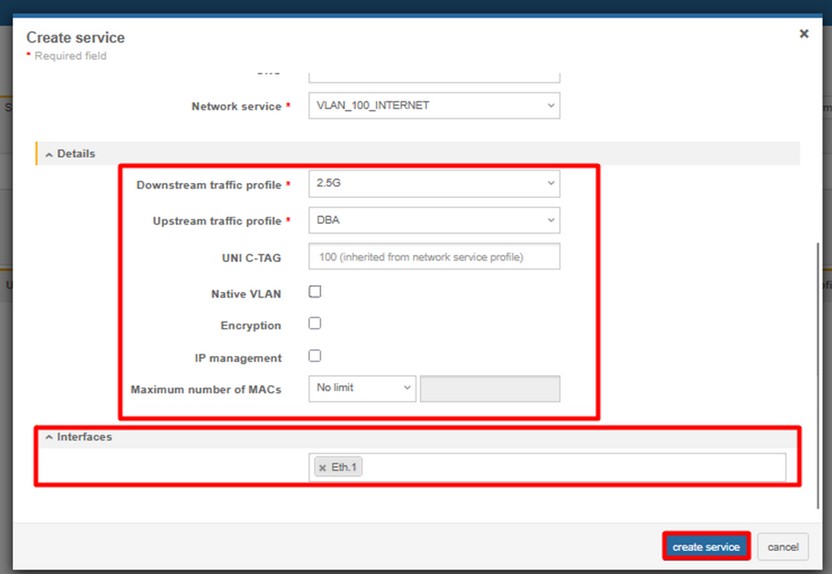
6. Add Client services to your ONU. (RESOURCES > SERVICES > CLIENT SERVICES)
INTERNET (VLAN 100)
IPTV (VLAN 200)
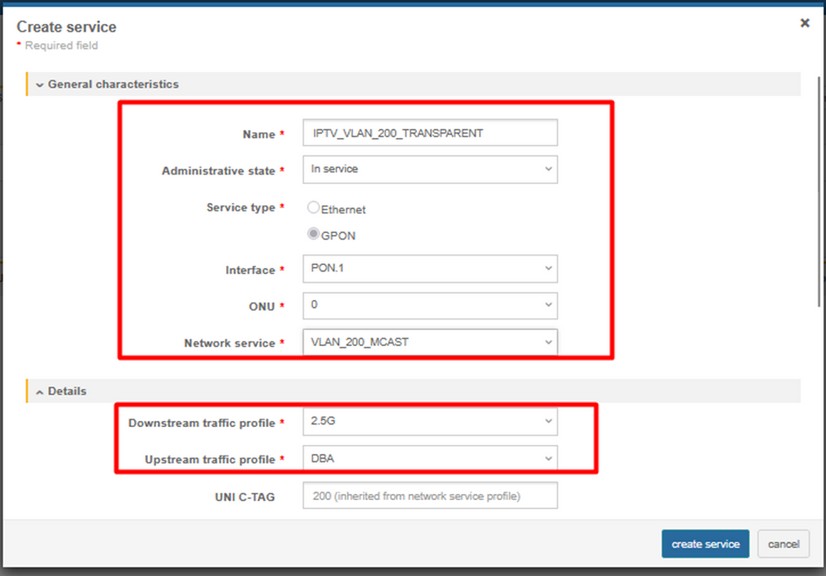
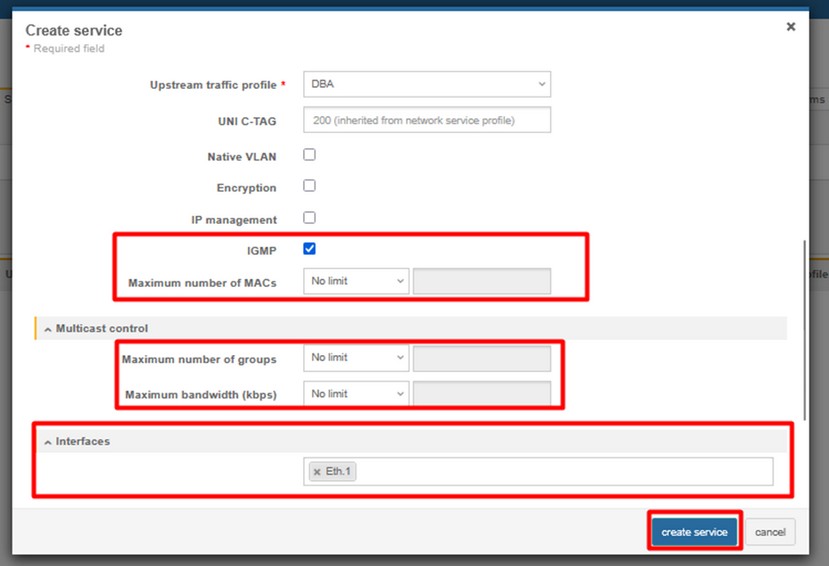
VoIP (VLAN 300)
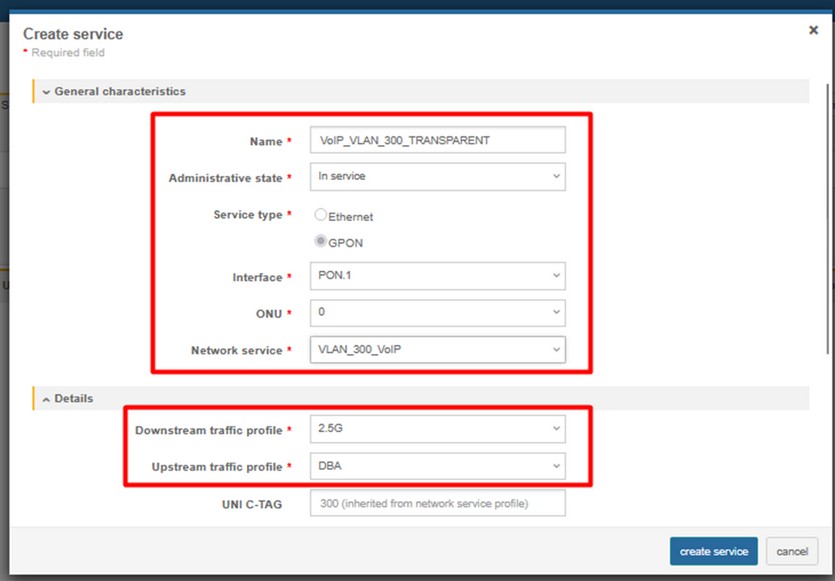
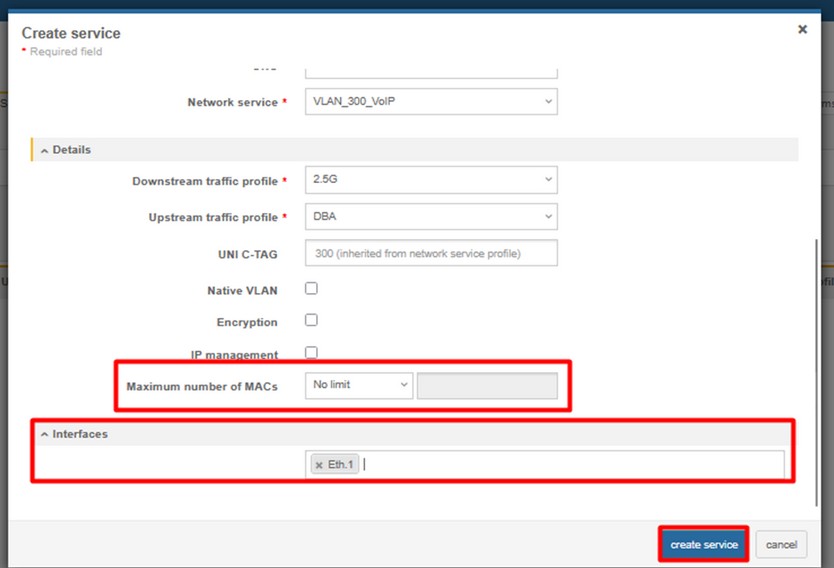
MGMT (VLAN 400)
4. ONT Configuration – (Service scenario VLAN TRANSLATION – rBSA)

1. Create ONT profile on OLT:
Click on the image to enlarge it.
(CONFIGURATIONS > GENERIC > EQUIPMENT MODELS > CREATE MODEL)
- NAME – name of the ONT profile (e.g HL-1B)
- VENDOR – HALNy
- MODEL – model of the ONT
- ADMINISTRATIVE STATE – switch to IN SERVICE
- ETH – put exact number of ETH ports of the ONT
- PON – 1
- RF – in case ONT is equipped with RF port
- VoIP - put exact number of POTS ports of the ONT
- VEIP – 1 – for MGMT IP host purposes
2. Add ONT to GPON port (RESOURCES > ONUs)
3. Create DBA profile (CONFIGURATIONS > PON > PON DBA PROFILES)
4. Create Ethernet bandwidth profile (CONFIGURATIONS > ETHERNET > ETHERNET BANDWIDTH PROFILE)
NOTE: HL-1B has one ETH 2.5G port, so there is need to setup ethernet bandwidth profile with higher EIR value than in profile named *1G* to match ETH 2.5G bandwidth.
5. Add Network services (VLANs) you need (RESOURCES > SERVICES > NETWORK SERVICES)
INTERNET – VLAN 100
MULTICAST – VLAN 200
VoIP – VLAN 300
MGMT – IP host – VLAN 400
Final result of configured network services should look like below:
6. Add Client services to your ONU. (RESOURCES > SERVICES > CLIENT SERVICES)
INTERNET
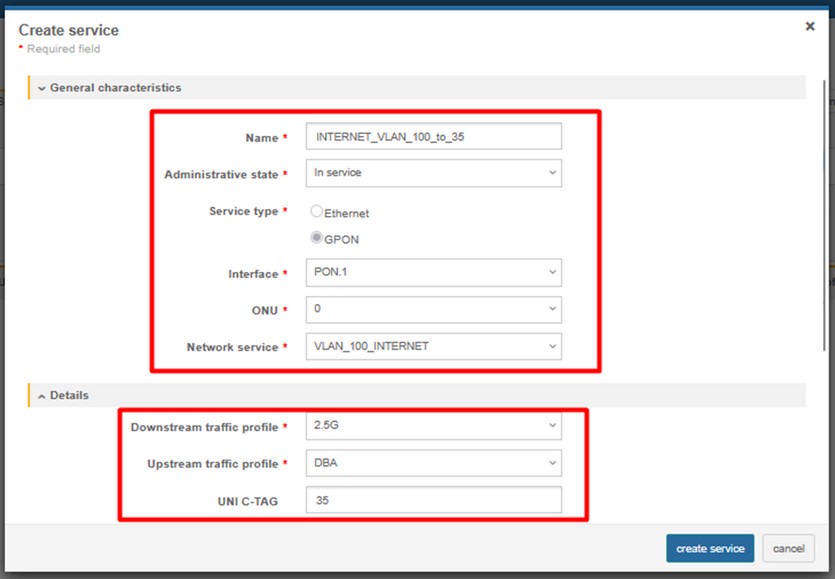
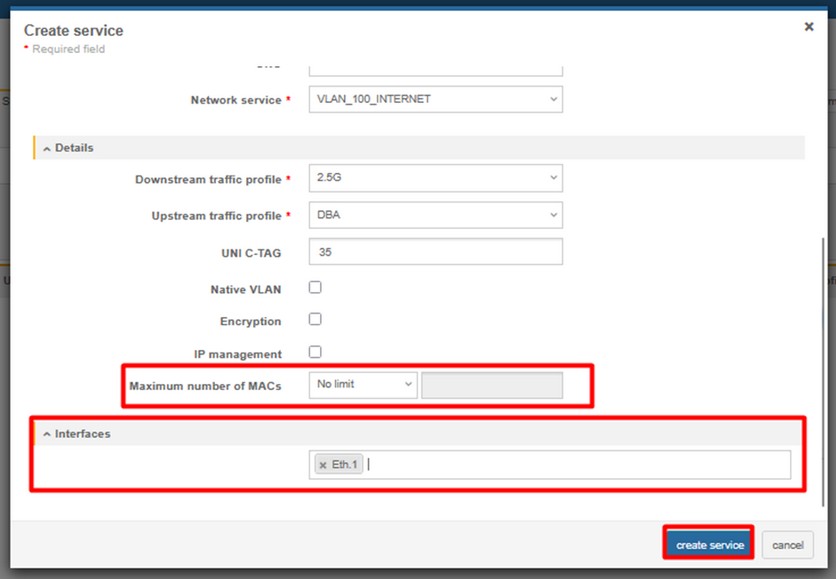
IPTV
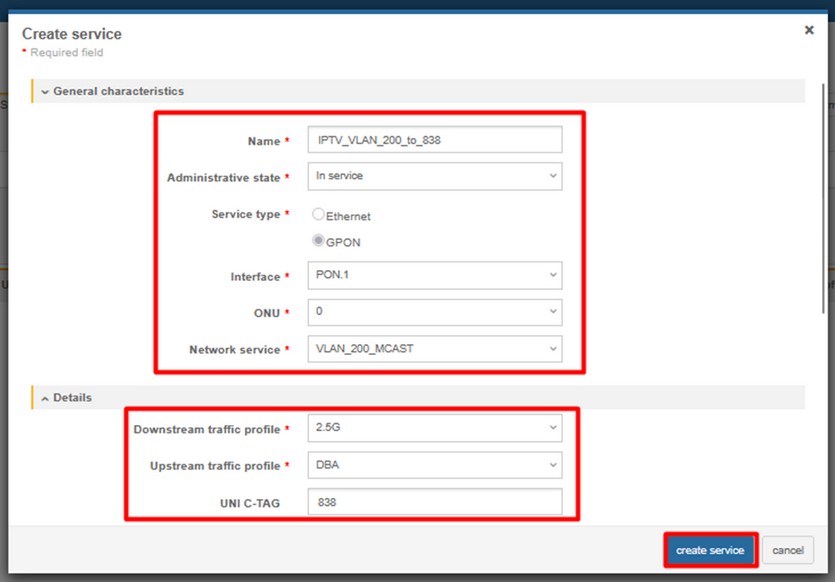
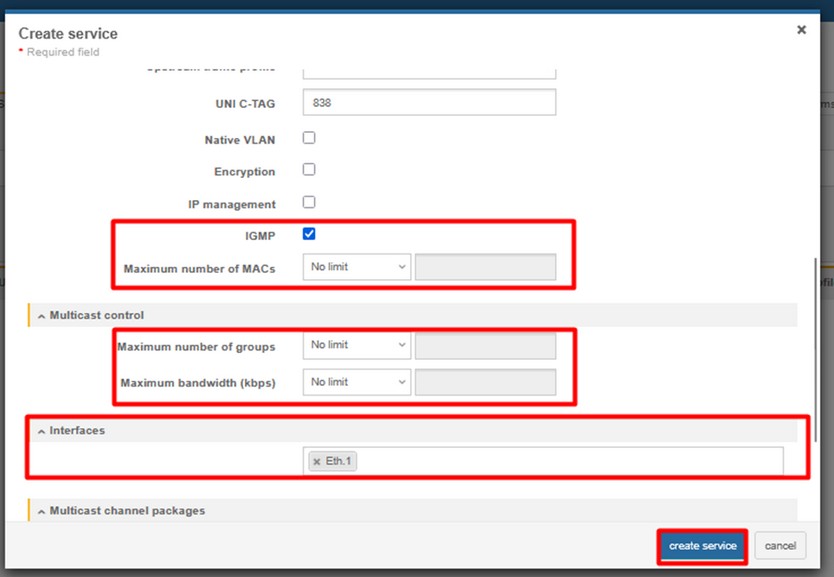
VoIP
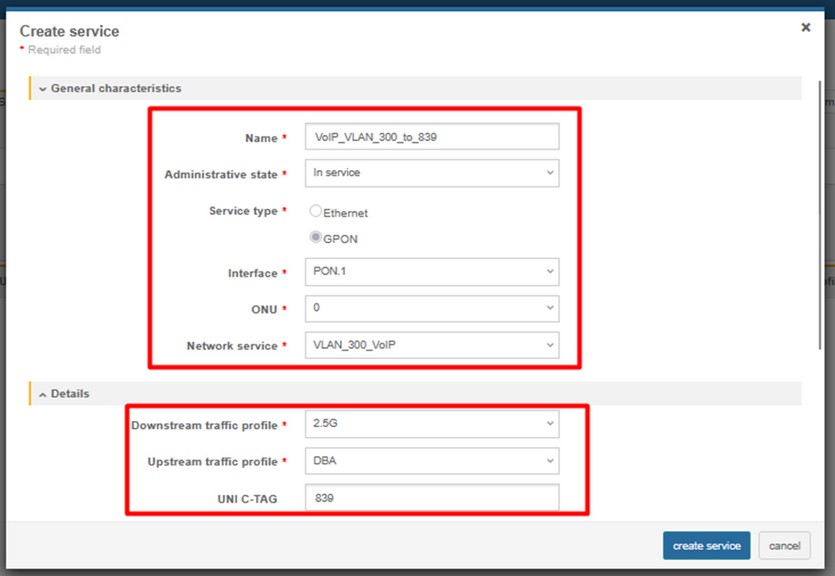
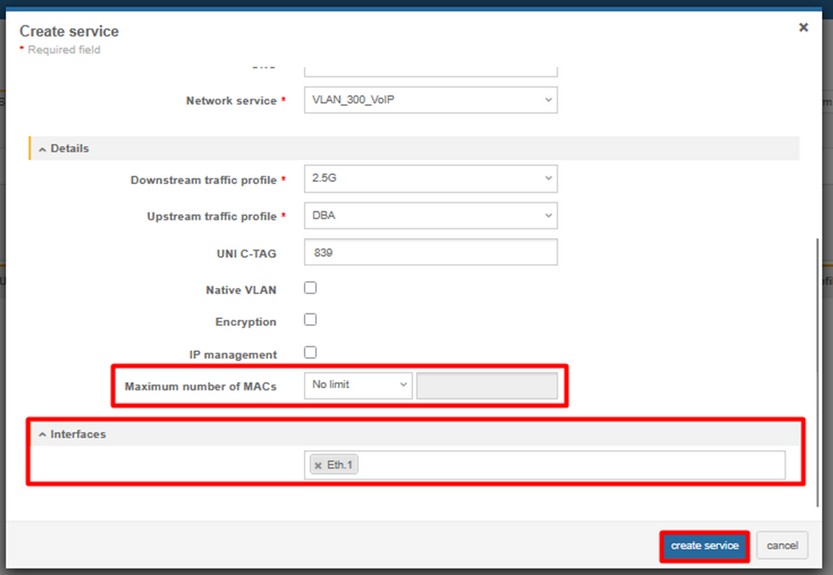
MGMT – IP host
5. ONT Configuration – QinQ (802.1q in 802.1q Begin/End of Tunnel)

1. Create ONT profile on OLT:
Click on the image to enlarge it.
(CONFIGURATIONS > GENERIC > EQUIPMENT MODELS > CREATE MODEL)
- NAME – name of the ONT profile (e.g HL-1B)
- VENDOR – HALNy
- MODEL – model of the ONT
- ADMINISTRATIVE STATE – switch to IN SERVICE
- ETH – put exact number of ETH ports of the ONT
- PON – 1
- RF – in case ONT is equipped with RF port
- VoIP - put exact number of POTS ports of the ONT
- VEIP – 1 – for MGMT IP host purposes
2. Add ONT to GPON port (RESOURCES > ONUs)
3. Create DBA profile (CONFIGURATIONS > PON > PON DBA PROFILES)
4. Create Ethernet bandwidth profile (CONFIGURATIONS > ETHERNET > ETHERNET BANDWIDTH PROFILE)
NOTE: HL-1B has one ETH 2.5G port, so there is need to setup ethernet bandwidth profile with higher EIR value than in profile named *1G* to match ETH 2.5G bandwidth.
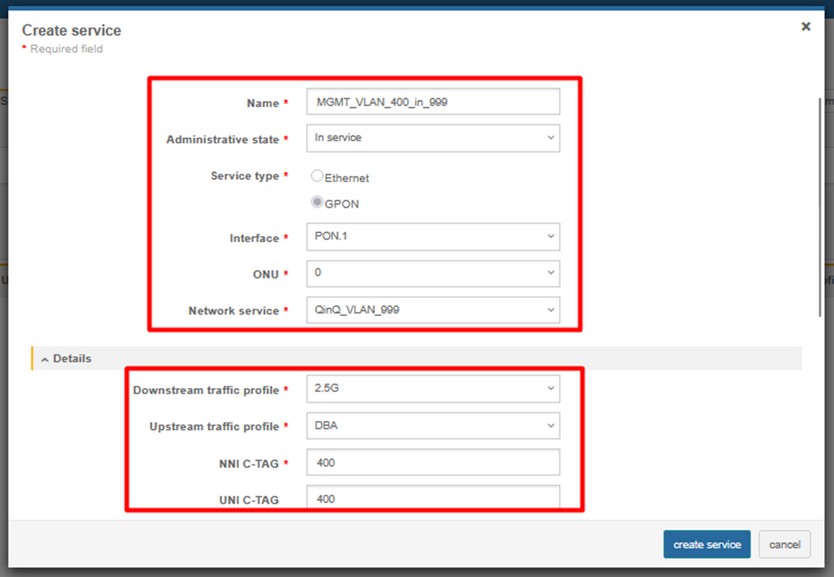
5. Add Network service (S-VLAN) you need (RESOURCES > SERVICES > NETWORK SERVICES)
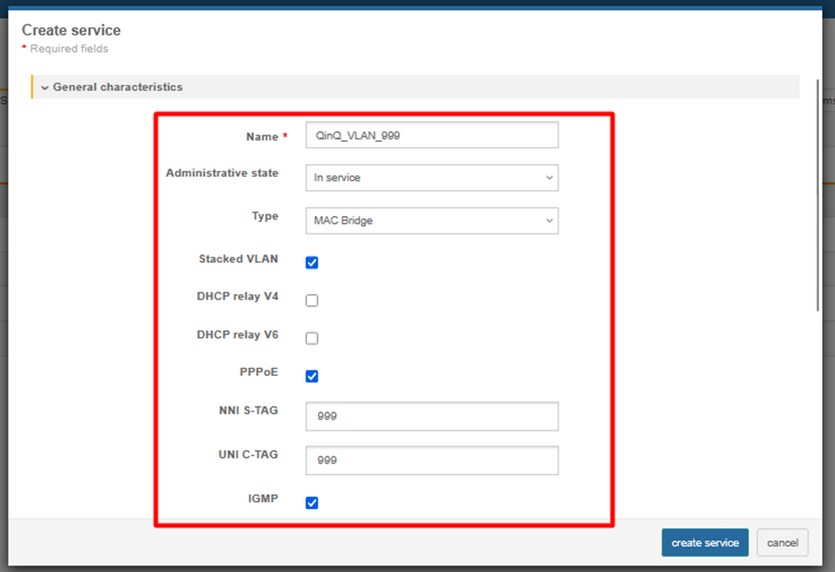
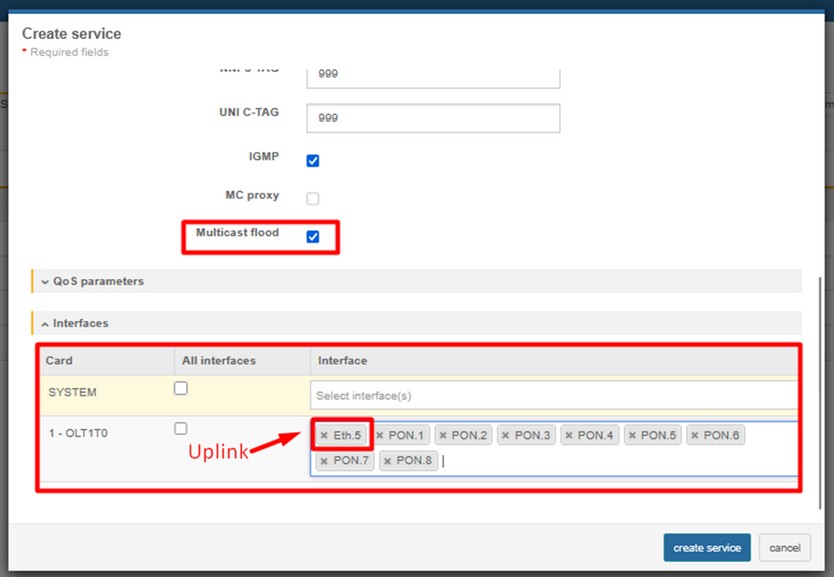
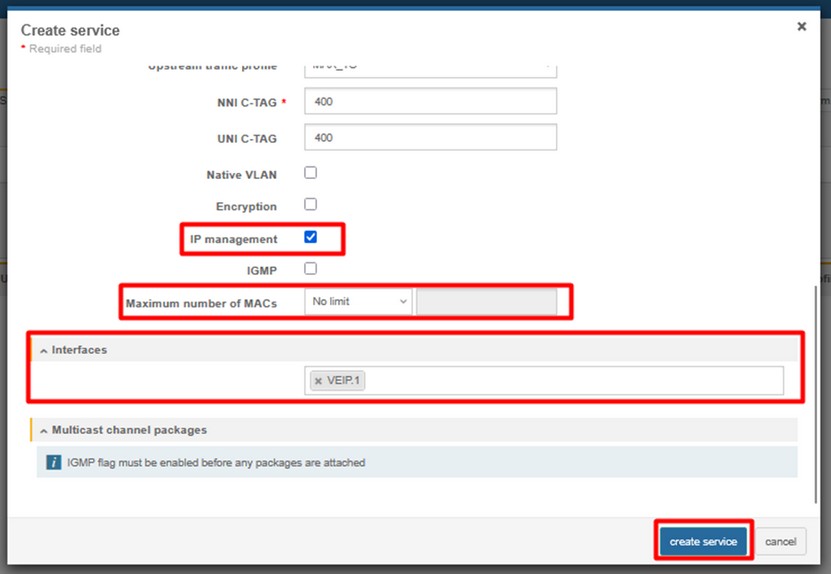
6. Add Client services (C-VLANs) to your ONU. (RESOURCES > SERVICES > CLIENT SERVICES)
INTERNET (C-VLAN 100 in S-VLAN 999)
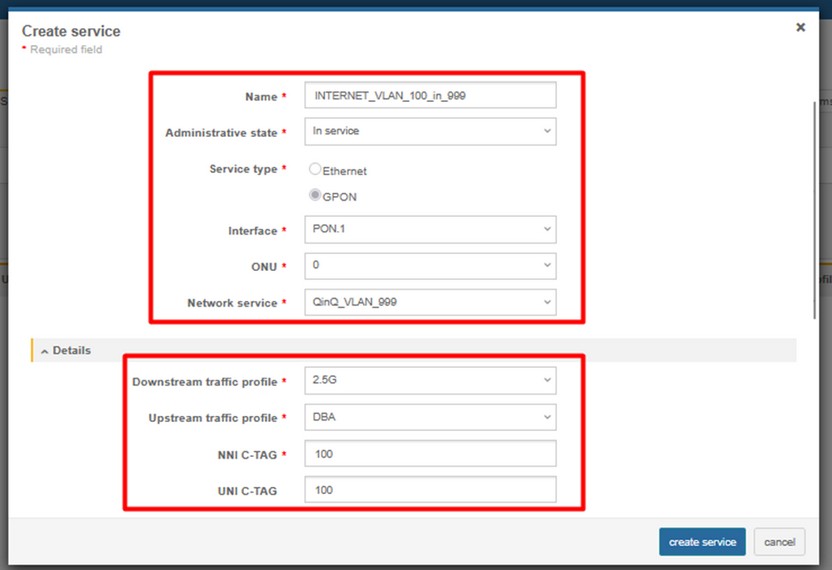
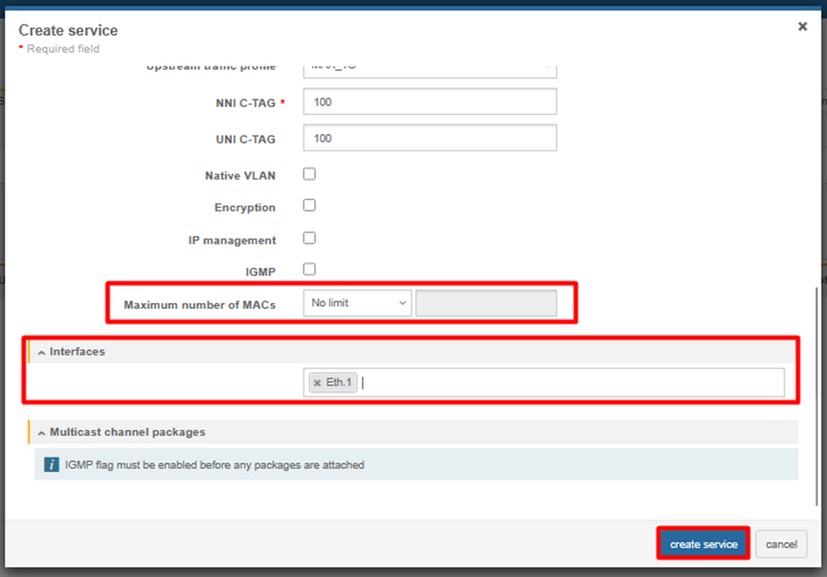
IPTV (C-VLAN 200 in S-VLAN 999)
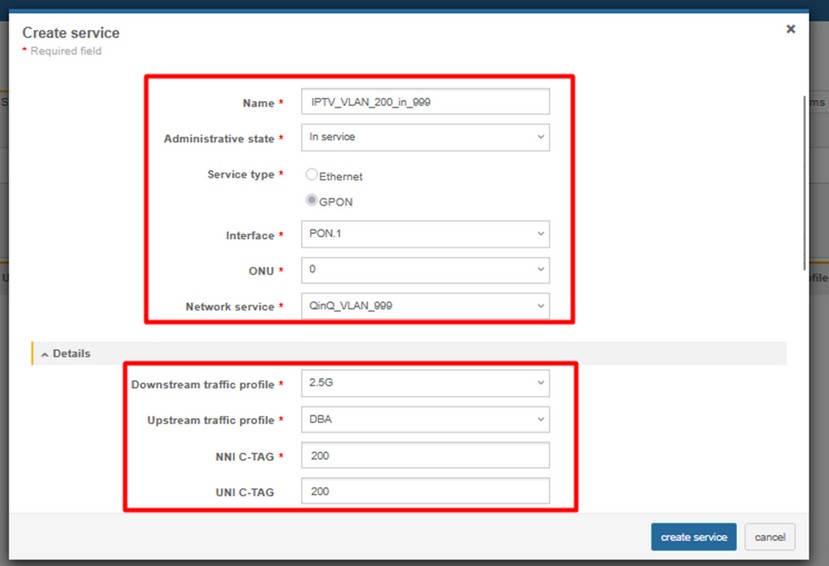
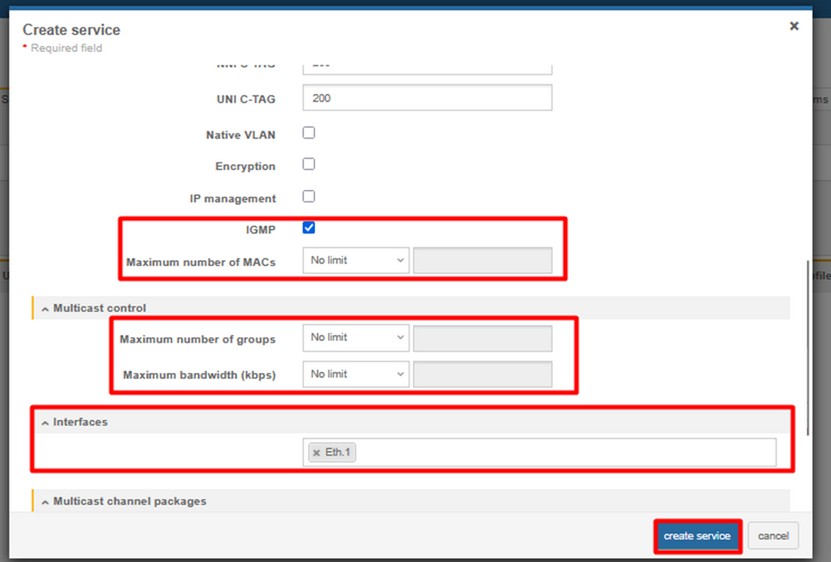
VoIP (C-VLAN 300 in S-VLAN 999)
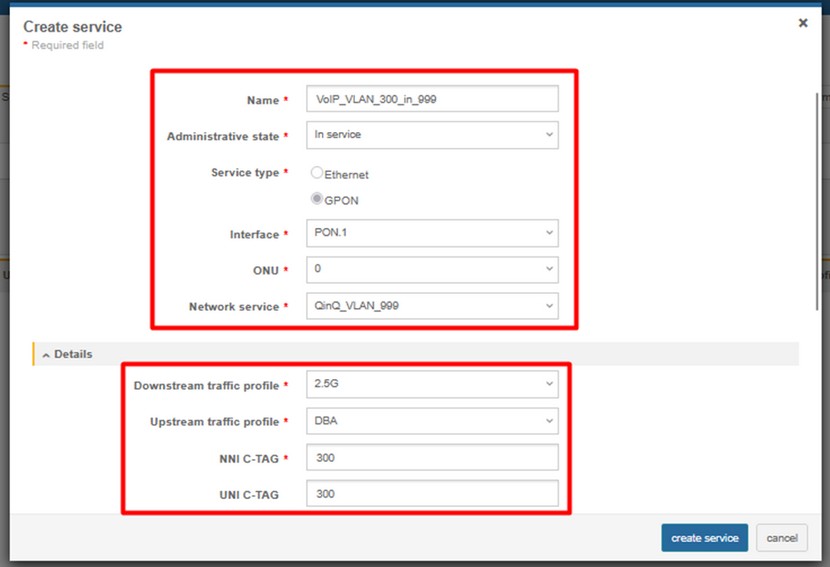
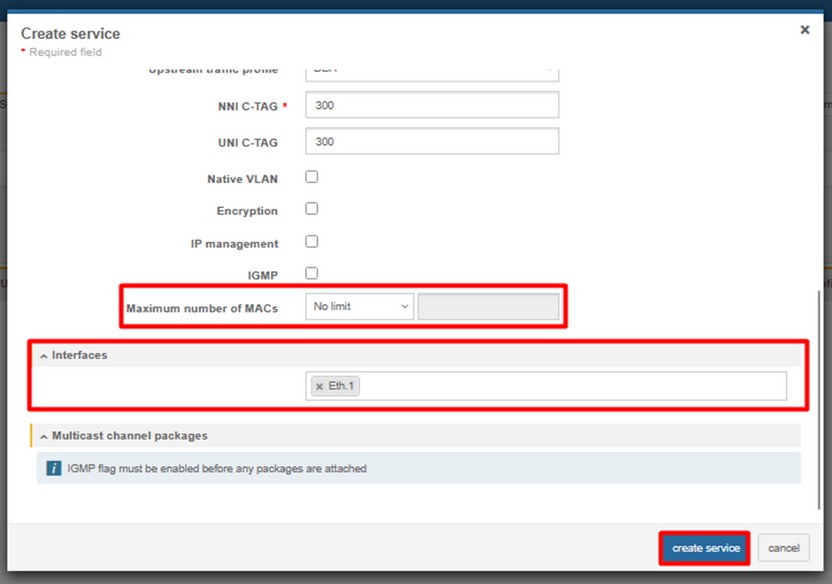
MGMT (C-VLAN 400 in S-VLAN 999) (Optional)
6. ONT Configuration (Service scenario – TRANSPARENT QinQ)

1. Create ONT profile on OLT:
Click on the image to enlarge it.
(CONFIGURATIONS > GENERIC > EQUIPMENT MODELS > CREATE MODEL)
- NAME – name of the ONT profile (e.g HL-1B)
- VENDOR – HALNy
- MODEL – model of the ONT
- ADMINISTRATIVE STATE – switch to IN SERVICE
- ETH – put exact number of ETH ports of the ONT
- PON – 1
- RF – in case ONT is equipped with RF port
- VoIP - put exact number of POTS ports of the ONT
- VEIP – 1 – for MGMT IP host purposes
2. Add ONT to GPON port (RESOURCES > ONUs)
3. Create DBA profile (CONFIGURATIONS > PON > PON DBA PROFILES)
4. Create Ethernet bandwidth profile (CONFIGURATIONS > ETHERNET > ETHERNET BANDWIDTH PROFILE)
NOTE: HL-1B has one ETH 2.5G port, so there is need to setup ethernet bandwidth profile with higher EIR value than in profile named *1G* to match ETH 2.5G bandwidth.
5. Add Network service (S-VLAN) you need (RESOURCES > SERVICES > NETWORK SERVICES)
6. Add Client services (S-VLAN passthrough) to your ONU. (RESOURCES > SERVICES > CLIENT SERVICES)
S-VLAN 999 transparent passthrough
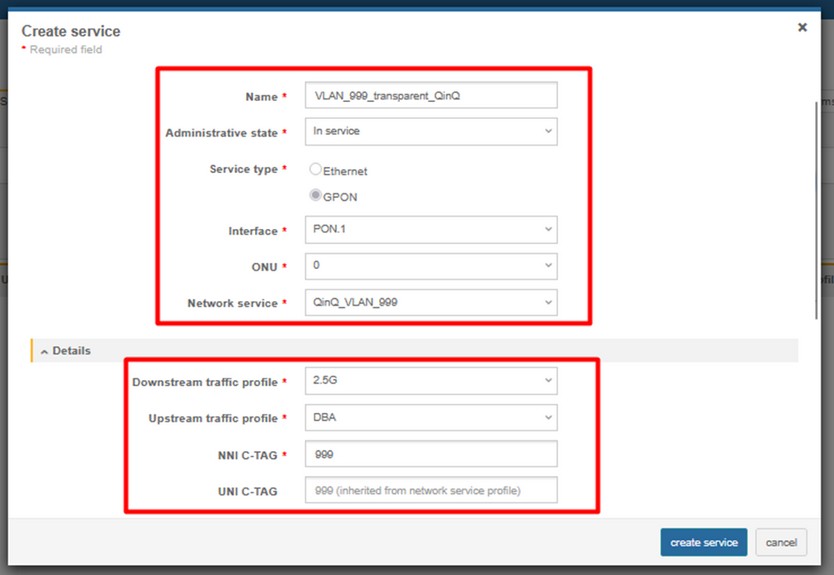
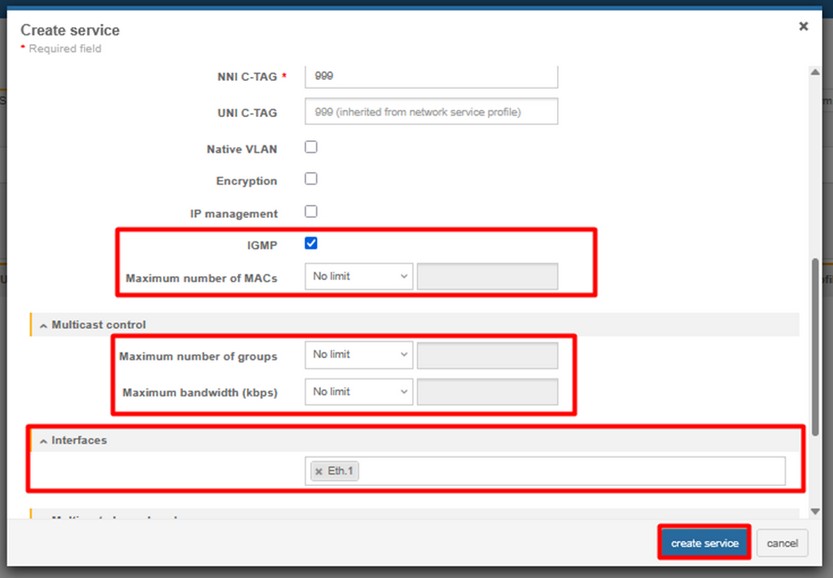
MGMT – VLAN 400 (Optional)
7. ONT Configuration (Service scenario – OSE/Md0)

1. Create ONT profile on OLT:
Click on the image to enlarge it.
(CONFIGURATIONS > GENERIC > EQUIPMENT MODELS > CREATE MODEL)
- NAME – name of the ONT profile (e.g HL-1B)
- VENDOR – HALNy
- MODEL – model of the ONT
- ADMINISTRATIVE STATE – switch to IN SERVICE
- ETH – put exact number of ETH ports of the ONT
- PON – 1
- RF – in case ONT is equipped with RF port
- VoIP - put exact number of POTS ports of the ONT
- VEIP – 1 – for MGMT IP host purposes
2. Add ONT to GPON port (RESOURCES > ONUs)
3. Create DBA profile (CONFIGURATIONS > PON > PON DBA PROFILES)
4. Create Ethernet bandwidth profile (CONFIGURATIONS > ETHERNET > ETHERNET BANDWIDTH PROFILE)
NOTE: HL-1B has one ETH 2.5G port, so there is need to setup ethernet bandwidth profile with higher EIR value than in profile named *1G* to match ETH 2.5G bandwidth.
5. Add Network service (S-VLAN) you need (RESOURCES > SERVICES > NETWORK SERVICES)
6. Add Client services (Translated C-VLANs) to your ONU. (RESOURCES > SERVICES > CLIENT SERVICES)
INTERNET (Translated C-VLAN 35 (100) in S-VLAN 999)
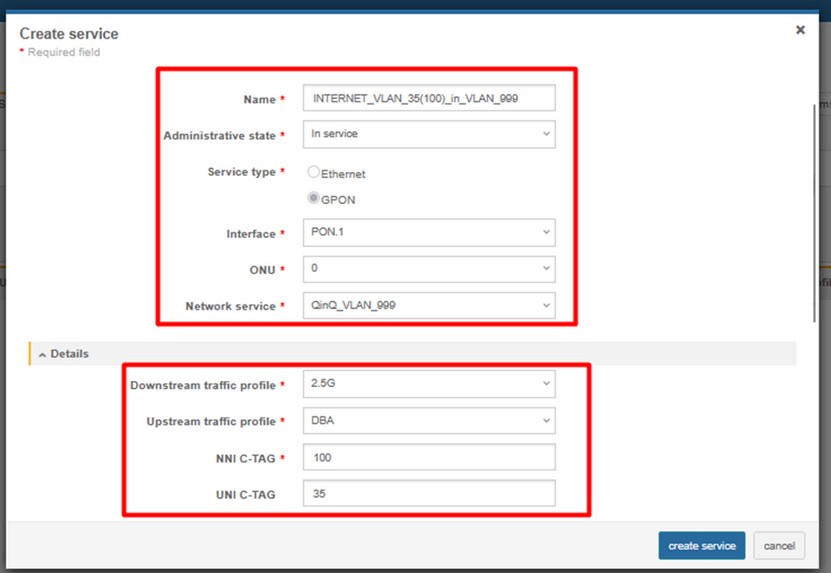
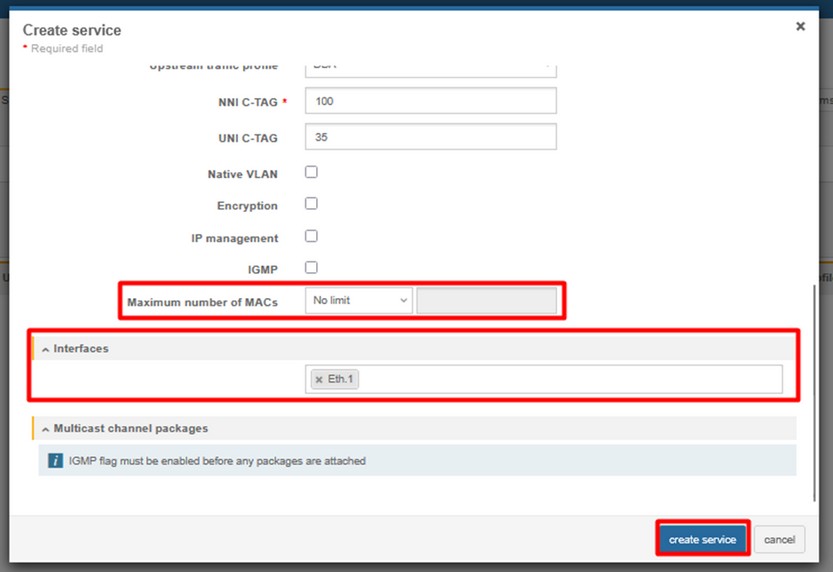
IPTV (Translated C-VLAN 838 (200) in S-VLAN 999)
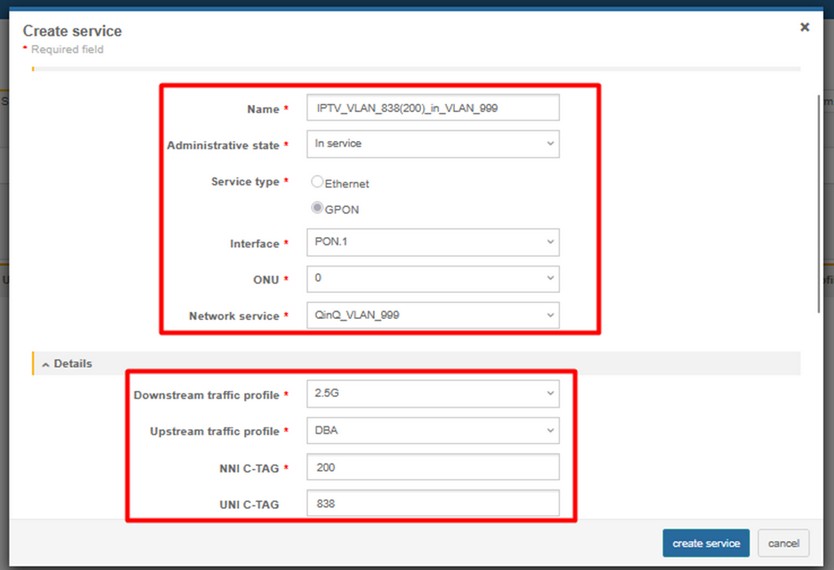
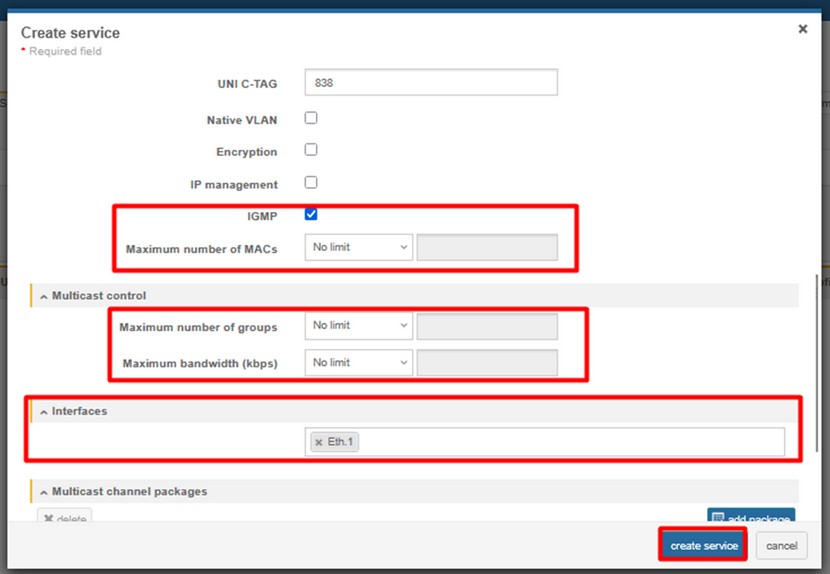
VOIP (Translated C-VLAN 839 (300) in S-VLAN 999)
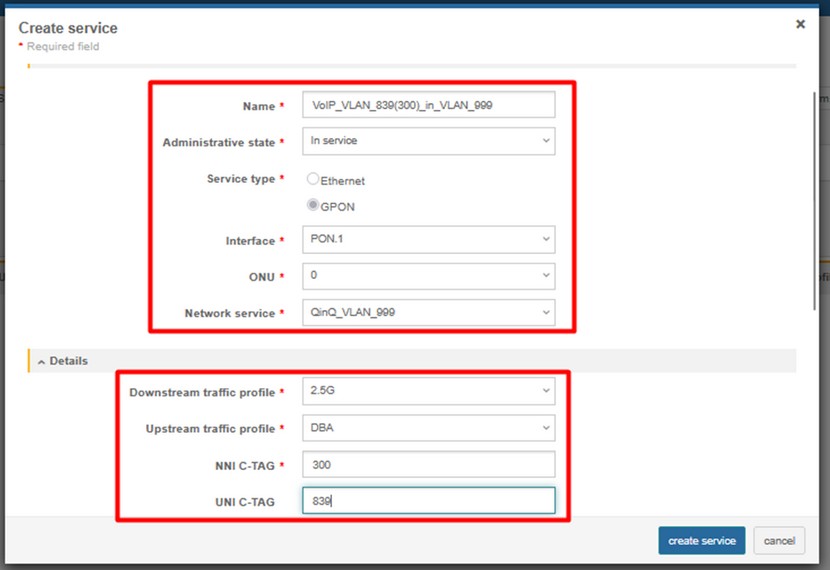
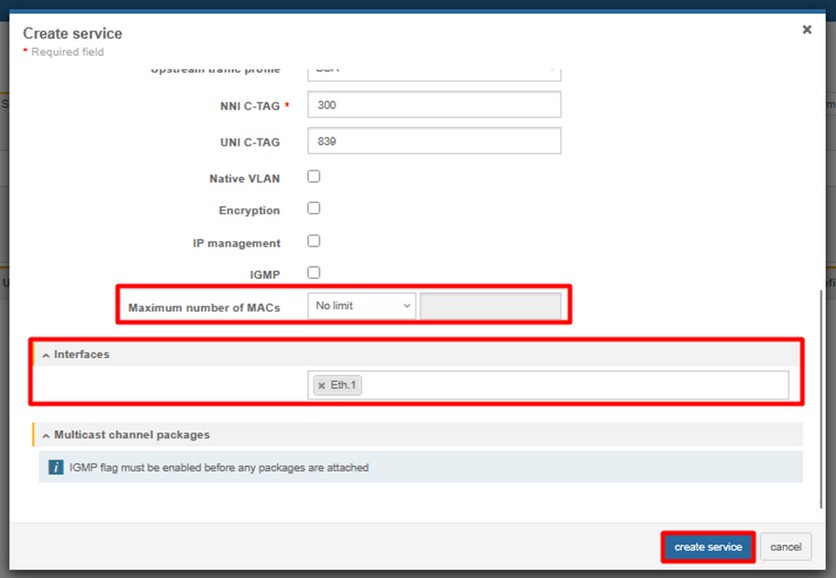
MGMT – VLAN 400 (Optional)
ONT Managment
Note: Most provisioning and upgrade options below require ONT to have a valid IP Host setup. For detailed information regarding IP Host click here.
| Method | Configuration | Upgrade |
| Rest API V2 | [Example] | – |
| XML Provisioning [DHCP 66/67, WEB] | [Example] | – |
| OTT | – | [Example] |
| OLT CLI | – | [Example] |
| TR-069 [DHCP 43] | [Example] | [Example] |
| WEB | [Example] | [Example] |
| Found something we can improve? Let us know at support@halny.com |
