
Have a Question?
[ADTRAN] TA5004 OLT Integration with HALNy SFU 4 LAN
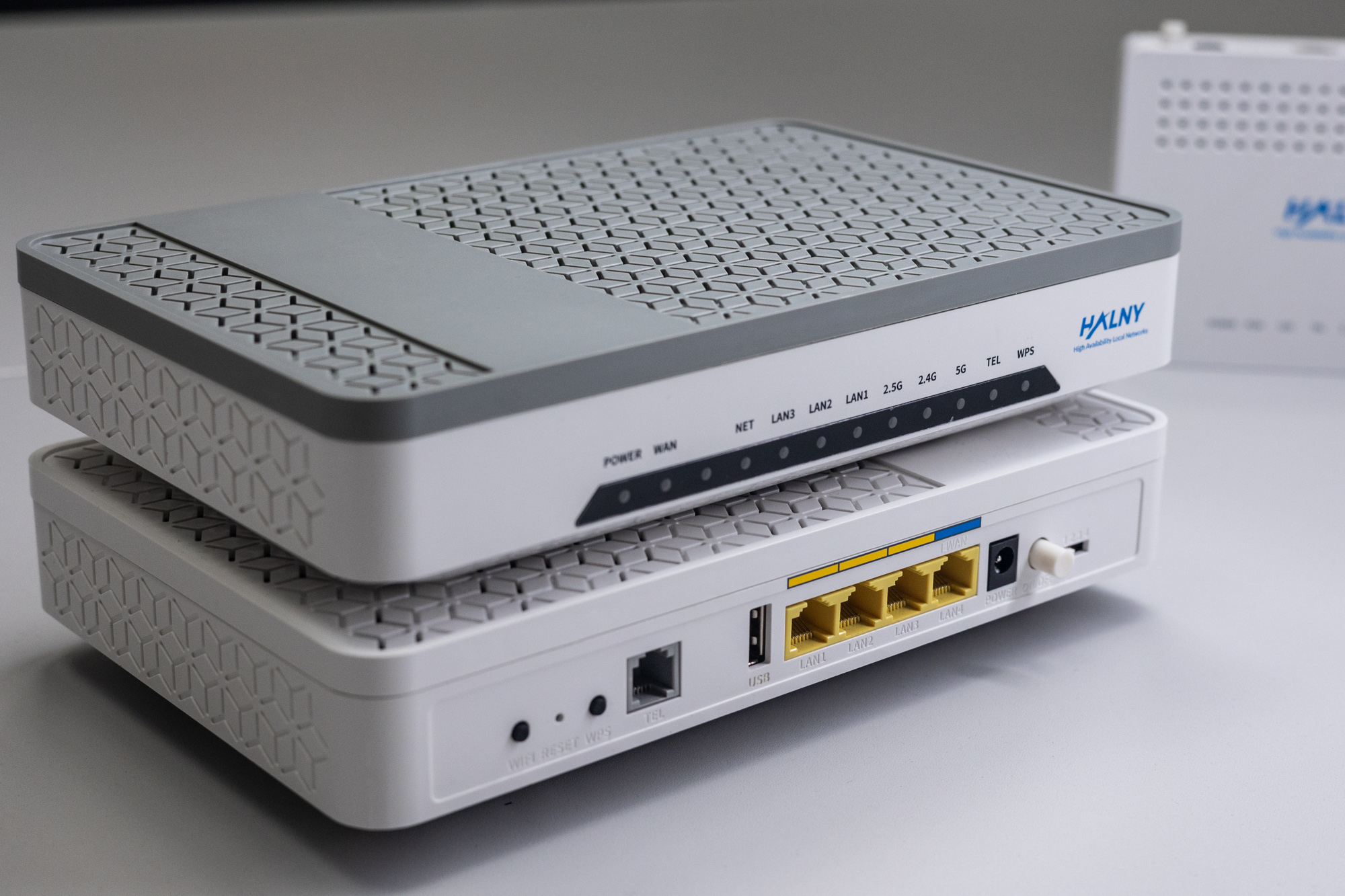
HALNy Integration
Supported SFU service scenarios
1. ONT configuration (Access mode, only INTERNET)

ONT was connect to the shelf 1, card 3, GPON port 1 with ONU_ID 13.
Attention: Remeber to enable interfaces using the “no shutdown” command
1.Create Internet and MGMT EVC:
evc "100"
  s-tag 100
  connect men-port ten-gigabit-ethernet 1/B/1
  mac-switched
  no preserve-ce-vlan
  no shutdown

evc "MGMT"
  s-tag 400
  connect men-port ten-gigabit-ethernet 1/B/1
  mac-switched
  no preserve-ce-vlan
  no shutdown
2.Register ONT:
remote-device ont 13@1/3/1.gpon
  description "HL-4G2"
  mac-spoofing-allowed enable
  serial-number "HALN08638E28"
  no shutdown
3.Enable interfaces:
LAN1:
interface gigabit-ethernet 13/0/1@1/3/1
  mac limit 8
  no shutdown
LAN2:
interface gigabit-ethernet 13/0/2@1/3/1
  mac limit 8
  no shutdown
LAN3:
interface gigabit-ethernet 13/0/3@1/3/1
  mac limit 8
  no shutdown
LAN4:
interface gigabit-ethernet 13/0/4@1/3/1
  mac limit 8
  no shutdown
4.Enable SFU mode:
Attention: You have to use “shutdown” command for SFU mode.
interface virtual-gigabit-ethernet 13/0/1@1/3/1.gpon
  mac limit 8
  shutdown
5.Configure ONT LAN interfaces:
LAN1:
evc-map "13/0/1@1/3/1.gpon" 1/3
  connect evc "100"
  connect uni gigabit-ethernet 13/0/1@1/3/1
  men-pri 0
  men-c-tag-pri 0
  no shutdown
LAN2:
evc-map "13/0/2@1/3/1.gpon" 1/3
  connect evc "100"
  connect uni gigabit-ethernet 13/0/2@1/3/1
  men-pri 0
  men-c-tag-pri 0
  no shutdown
LAN3:
evc-map "13/0/3@1/3/1.gpon" 1/3
  connect evc "100"
  connect uni gigabit-ethernet 13/0/3@1/3/1
  men-pri 0
  men-c-tag-pri 0
  no shutdown
LAN4:
evc-map "13/0/4@1/3/1.gpon" 1/3
  connect evc "100"
  connect uni gigabit-ethernet 13/0/4@1/3/1
  men-pri 0
  men-c-tag-pri 0
  no shutdown
6.Configure management ip-host:
interface gpon 1/3/1
  subtended-host 13 ip address dhcp
  subtended-host 13 s-tag 400
7.Configure downstream shaper:
shaper "13@1/3/1.gpon" 1/3
  per remote-device 13@1/3/1.gpon queue 0
  rate 1000000
  no shutdown
8.Configure upstream shaper:
shaper "13@1/3/1.gpon-UP" 13@1/3/1.gpon
  per interface gpon 13/0/1@1/3/1.gpon channel 1
  rate 1200000
  gpon channel assured-bandwidth 2500
  gpon channel fixed-bandwidth 0
  no shutdown
2. ONT configuration (Access mode, INTERNET, IP-HOST, VoIP)
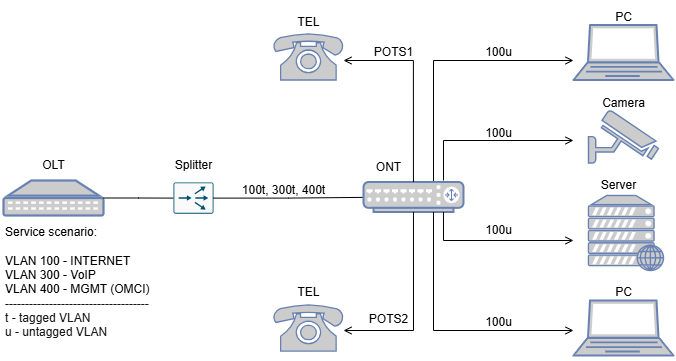
ONT was connect to the shelf 1, card 3, GPON port 2 with ONU_ID 2.
Attention: Remeber to enable interfaces using the “no shutdwon” command
1.Create Internet and MGMT EVC:
evc "100"
  s-tag 100
  connect men-port ten-gigabit-ethernet 1/B/1
  mac-switched
  no preserve-ce-vlan
  no shutdown

evc "MGMT"
  s-tag 400
  connect men-port ten-gigabit-ethernet 1/B/1
  mac-switched
  no preserve-ce-vlan
  no shutdown
2.Create VoIP EVC:
evc "300"
  s-tag 300
  connect men-port ten-gigabit-ethernet 1/B/1
  mac-switched
  no preserve-ce-vlan
  no shutdown
3.Register ONT:
remote-device ont 2@1/3/2.gpon
  description "HL-4GV-F"
  mac-spoofing-allowed enable
  serial-number "HALN5a6fa578"
  no shutdown
4.Enable interfaces:
LAN1:
interface gigabit-ethernet 2/0/1@1/3/2
  mac limit 8
  no shutdown
LAN2:
interface gigabit-ethernet 2/0/2@1/3/2
  mac limit 8
  no shutdown
LAN3:
interface gigabit-ethernet 2/0/3@1/3/2
  mac limit 8
  no shutdown
LAN4:
interface gigabit-ethernet 2/0/4@1/3/2
  mac limit 8
  no shutdown
5.Enable SFU mode:
Attention: You have to use “shutdown” command for SFU mode.
interface virtual-gigabit-ethernet 2/0/1@1/3/2.gpon
  mac limit 8
  shutdown
6.Configure ONT LAN interfaces:
LAN1:
evc-map "2/0/1@1/3/2.gpon" 1/3
  connect evc "100"
  connect uni gigabit-ethernet 2/0/1@1/3/2
  men-pri 0
  men-c-tag-pri 0
  no shutdown
LAN2:
evc-map "2/0/2@1/3/2.gpon" 1/3
  connect evc "100"
  connect uni gigabit-ethernet 2/0/2@1/3/2
  men-pri 0
  men-c-tag-pri 0
  no shutdown
LAN3:
evc-map "2/0/3@1/3/2.gpon" 1/3
  connect evc "100"
  connect uni gigabit-ethernet 2/0/3@1/3/2
  men-pri 0
  men-c-tag-pri 0
  no shutdown
LAN4:
evc-map "2/0/4@1/3/2.gpon" 1/3
  connect evc "100"
  connect uni gigabit-ethernet 2/0/4@1/3/2
  men-pri 0
  men-c-tag-pri 0
  no shutdown
7.Configure EVC map for VOICE ip-host:
evc-map "1-3-2-2" 1/3
  connect evc "300"
  connect ip-host "1-3-2-2" 2@1/3/2.gpon
  men-pri 5
  men-c-tag-pri 5
  match ce-vlan-id 300
  no shutdown
8.Configure ip-host:
interface gpon 1/3/2
  subtended-host 2 ip address dhcp
  subtended-host 2 s-tag 400
9.Configure downstream shaper:
shaper "2@1/3/2.gpon" 1/3
  per remote-device 2@1/3/2.gpon queue 0
  rate 1000000
  no shutdown
10.Configure upstream shaper:
shaper "2@1/3/2.gpon-UP" 2@1/3/2.gpon
  per interface gpon 2/0/1@1/3/2.gpon channel 1
  rate 1200000
  gpon channel assured-bandwidth 2500
  gpon channel fixed-bandwidth 0
  no shutdown
11.Configure VOIP ip-host:
interface ip-host "1-3-2-2" 2@1/3/2.gpon
  ip address dhcp
  connect service sip
  no shutdown
12.Enable fxs interface:
interface fxs 2/0/1@1/3/2
  no shutdown
interface fxs 2/0/2@1/3/2
  no shutdown
13.Enable voice protocol:
voice protocol 2@1/3/2 sip14.Configure profile codec-list:
voice profile codec-list "SIP_Codec"
  preference 1 codec g729
  preference 2 codec g711alaw
  preference 3 codec g711ulaw
15.Configure profile call-feature:
voice profile call-feature "SIP_CALL"
  feature-mode local
16.Configure profile dial-plan:
voice profile dialing "Default_DIAL_PLAN"
  description ""
  dial-plan local XXX
  dial-plan local XXXX
17.Configure profile media:
voice profile media "SIP_MEDIA"
  rtp local-port 50000-60000
18.Configure sip-trunk:
voice sip-trunk T01
  sip proxy primary IP.IP.IP.IP
  sip registrar primary IP.IP.IP.IP
  sip registrar expire-time 560
  domain ""
  sip grammar request-uri host-resolve
19.Configure sip user:
voice user sip 2/0/1@1/3/2
  description "9999"
  connect fxs 2/0/1@1/3/2
  connect profile codec-list "SIP_CODEC"
  connect profile call-feature "SIP_CALL"
  connect profile dial-plan "Default_DIAL_PLAN"
  connect profile media "SIP_MEDIA"
  identity "9999"
  sip-trunk "T01"
  auth-name "9999"
  password "123456789"
  no shutdown
voice user sip 2/0/2@1/3/2
  description "8888"
  connect fxs 2/0/2@1/3/2
  connect profile codec-list "SIP_CODEC"
  connect profile call-feature "SIP_CALL"
  connect profile dial-plan "Default_DIAL_PLAN"
  connect profile media "SIP_MEDIA"
  identity "8888"
  sip-trunk "T01"
  auth-name "8888"
  password "123456789"
  no shutdown
3. ONT configuration (Transparent mode, only INTERNET)

ONT was connect to the shelf 1, card 3, GPON port 2 with ONU_ID 13.
Attention: Remeber to enable interfaces using the “no shutdown” command
1.Create Internet and MGMT EVC:
evc "EVC-Internet"
  s-tag 100
  connect men-port ten-gigabit-ethernet 1/B/1
  mac-switched
  no preserve-ce-vlan
  no shutdown

evc "MGMT"
  s-tag 400
  connect men-port ten-gigabit-ethernet 1/B/1
  mac-switched
  no preserve-ce-vlan
  no shutdown
2.Register ONT:
remote-device ont 13@1/3/1.gpon
  description "HL-1GE"
  mac-spoofing-allowed enable
  serial-number "HALN08638E28"
  no shutdown
3.Enable interfaces:
LAN1:
interface gigabit-ethernet 13/0/1@1/3/1
  mac limit 8
  no shutdown
LAN2:
interface gigabit-ethernet 13/0/2@1/3/1
  mac limit 8
  no shutdown
LAN3:
interface gigabit-ethernet 13/0/3@1/3/1
  mac limit 8
  no shutdown
LAN4:
interface gigabit-ethernet 13/0/4@1/3/1
  mac limit 8
  no shutdown
4.Enable SFU mode:
Attention: You have to use “shutdown” command for SFU mode.
interface virtual-gigabit-ethernet 13/0/1@1/3/1.gpon
  mac limit 8
  shutdown
5.Configure ONT interface LAN 1:
LAN1:
evc-map "13/0/1@1/3/1.gpon" 1/3
  connect evc "100"
  connect uni gigabit-ethernet 13/0/1@1/3/1
  men-pri 0
  men-c-tag-pri 0
  no shutdown
LAN2:
evc-map "13/0/2@1/3/1.gpon" 1/3
  connect evc "100"
  connect uni gigabit-ethernet 13/0/2@1/3/1
  men-pri 0
  men-c-tag-pri 0
  no shutdown
LAN3:
evc-map "13/0/3@1/3/1.gpon" 1/3
  connect evc "100"
  connect uni gigabit-ethernet 13/0/3@1/3/1
  men-pri 0
  men-c-tag-pri 0
  no shutdown
LAN4:
evc-map "13/0/4@1/3/1.gpon" 1/3
  connect evc "100"
  connect uni gigabit-ethernet 13/0/4@1/3/1
  men-pri 0
  men-c-tag-pri 0
  no shutdown
6.Configure management ip-host:
interface gpon 1/3/1
  subtended-host 13 ip address dhcp
  subtended-host 13 s-tag 400
7.Configure downstream shaper:
shaper "13@1/3/1.gpon" 1/3
  per remote-device 13@1/3/1.gpon queue 0
  rate 1000000
  no shutdown
8.Configure upstream shaper:
shaper "13@1/3/1.gpon-UP" 13@1/3/1.gpon
  per interface gpon 13/0/1@1/3/1.gpon channel 1
  rate 1200000
  gpon channel assured-bandwidth 2500
  gpon channel fixed-bandwidth 0
  no shutdown
ONT Managment
Note: Most provisioning and upgrade options below require ONT to have a valid IP Host setup. For detailed information regarding IP Host click here.
| Method | Configuration | Upgrade |
| Rest API V2 | [Example] | – |
| XML Provisioning [DHCP 66/67, WEB] | [Example] | – |
| OTT | – | [Example] |
| OLT CLI | – | – |
| TR-069 [DHCP 43] | [Example] | [Example] |
| WEB | [Example] | [Example] |
| Found something we can improve? Let us know at support@halny.com |
