
Have a Question?
Firmware customization
Overview
We are introducing a feature that allows ONT and Router software customization, so devices can be delivered fully configured right after firmware installation.
Firmware customization allows you to:
- Define default device settings
Prepare ONT/Router devices with predefined configurations so they are ready to use immediately after firmware installation. - Customize the web interface branding
Replace the default logos in the web interface with your own, keeping the look and feel consistent with your brand. - Change the web interface color scheme
Adjust colors and styling to match your visual identity or personal preferences, giving you full control over the interface appearance.
This feature gives operators more control, simplifies day-to-day operations, and helps create a consistent, branded experience across devices.
How to Prepare the Required Files
1. Description
To generate personalized software, please prepare a JSON file according to the example below and complete it with the required data.
INFO: Personalized software is generated only on the basis of the currently available software with OR status.
Before filling in the file, please read the full description of each field and complete all required keys in accordance with the instructions.
2. Example JSON File
"Client": {
  "client_id": "cli",
  "model": {
    "HL-4GXV-F": "example_XML.xml",
    "HL-4GMV4": "example_XML_2.xml",
    "HL-1GE": ""
  },
  "customization_V3_V4_V5": {
    "login_logo.jpg": "example_logo.jpg",
    "left_side_banner_logo.png": "example_banner_logo.png",
    "custom.css": "example_css_file.css"
  },
  "customization_V2": {
    "logo.gif": "example_logo.gif",
    "custom.css": "example_css_file_V2.css"
  }
}
3. Keys explanation
| Client | model | Client ID | customization_V3_V4_V5 | customization_V2 |
| REQUIRED | REQUIRED | OPTIONAL | OPTIONAL | OPTIONAL |
- Client [REQUIRED]
"Client": {
...
}
The key “Client” must be replaced with the name of the company requesting the personalized software.
- Client ID [OPTIONAL]
"client_id": "cli"The client_id value is a 3-character identifier that will be appended to the firmware filename. Example:
G_ONU_HL-4GXV-F_V3-2-51cli-e.bin
Client may propose the 3-character client_id. If the requested value is not already used by another client, we will assign it.
This field is optional. If key is not provided, it will be assigned automatically.
- model [REQUIRED]
  "model": {
    "HL-4GXV-F": "example_XML.xml",
    "HL-4GMV4": "example_XML_2.xml",
    "HL-1GE": ""
  },
In the model subtree, specify the ONT/Router models for which the personalized software should be generated
The key is the ONT/Router model name – HL-4GXV-F
The value is the name of the XML file assigned to the given model – example_XML.xml
The XML file is not mandatory – in such a case, the value may be left empty (e.g. “HL-1GE”: “”).
- customization_V3_V4_V5 [OPTIONAL]
  "customization_V3_V4_V5": {
    "login_logo.jpg": "example_logo.jpg",
    "left_side_banner_logo.png": "example_banner_logo.png",
    "custom.css": "example_css_file.css"
  },
The customization_V3_V4_V5 subtree is optional.
It allows uploading custom logos and adjusting the color scheme of the ONT/Router web interface using a CSS file.
This customization applies only to devices running the following firmware versions:
- V3.2.x
- V4.0.x
- V5.0.x
You can check ONT’s firmware series here.
Available files that can be customized:
login_logo.jpg – logo displayed on the ONT/Router login page.

- Required format: .jpg
- Recommended resolution: 337 x 117 px
- Maximum file size: 100 KB
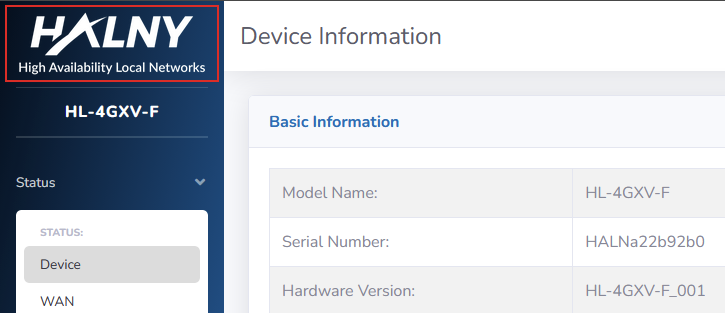
left_side_banner_logo.png – logo displayed on the left-side banner after logging in to the web interface.
- Required format: .png
- Recommended resolution: 613 x 199 px
- Maximum file size: 100 KB
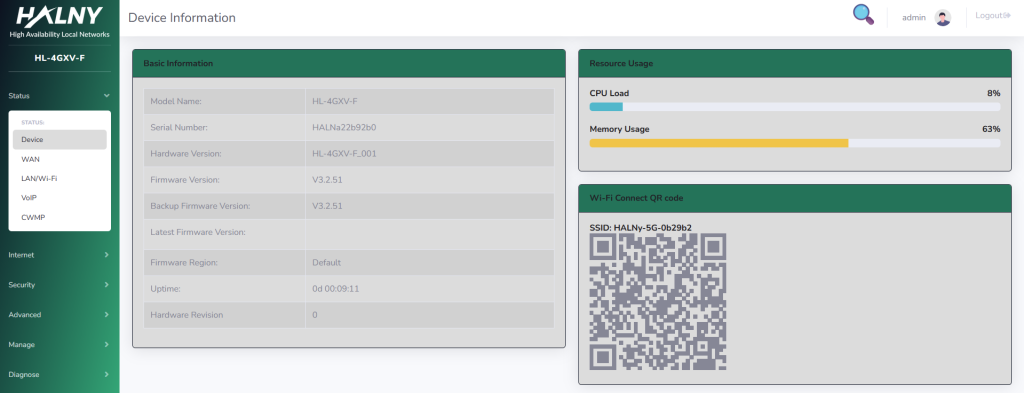
custom.css – CSS file used to customize colors and the appearance of the web interface.
Example css file can be downloaded here.
- Maximum file size: 20 KB
More detailed CSS file, and example of customization via OTT option 175 are available at our site via link.
- customization_V2 [OPTIONAL]
  "customization_V2": {
    "logo.gif": "example_logo.gif",
    "custom.css": "example_css_file_V2.css"
  }
The customization_V2 subtree is optional.
It allows uploading custom logos and adjusting the color scheme of the ONT/Router web interface using a CSS file.
This customization applies only to devices running firmware version:
- V2.0.x
You can check ONT’s firmware series here.
Available files that can be customized:
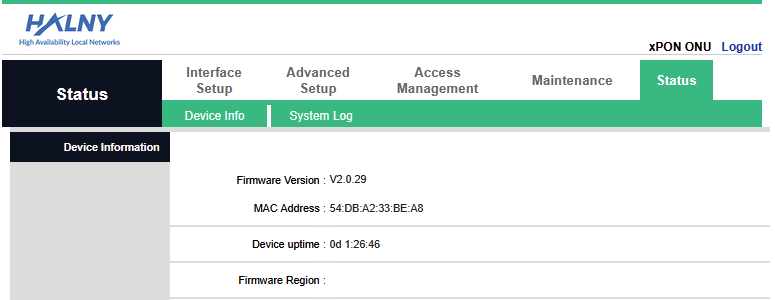
logo.gif – logo displayed after logging in to the ONT/Router web interface.

- Required format: .gif
- Recommended resolution: 202 x 75 px
- Maximum file size: 100 KB
custom.css – CSS file used to customize colors and the appearance of the web interface.
Example css file can be downloaded here.
- Maximum file size: 20 KB
Submission
After preparing the JSON file and all required files, please create a ticket on our helpdesk site and submit them. Ticket should contain:
- prepared JSON file,
- .zip archive containing all files referenced in the JSON file.
Important notice
WARNING: Once applied, customized settings remain active even after factory resets, as they are part of the customized firmware.
Please note that web interface customization (logos, CSS) becomes visible immediately after updating the device to the customized firmware version.
Configuration customization provided via the XML file is applied only after performing a factory reset on the device.
The customer bears full responsibility for the correctness, completeness, and compliance of the submitted files with the requirements described in this instruction.
HALNy Networks is not responsible for any errors resulting from incorrect files provided by the customer.