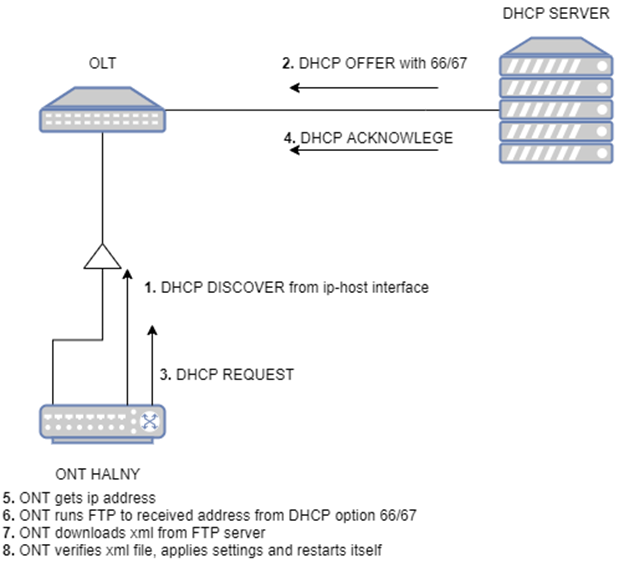
If DHCP option 66 and 67 is set, ONT will firstly try to download a file with the name set in option 67.
If option 67 is set to „serial” then ONT will try to download file with the name that comprises its GPON Serial number. For example, if GPON SN is HALN2006fff68 then ONT tries to download HALN206fff68.xml (the character after HALN has to be lowercase) file from FTP/TFTP/HTTP.
If the autoprovisioning mode is used without 67 (filename) set, but with option 66 (server name) set, ONT will only try to download a file with the name that comprises its GPON serial number – HALN206fff68.xml
*DHCP option 66/67 has higher priority that Dasan Provisioning – when you have atleast DHCP 66 option configured on your DHCP server, Dasan Provisiong won’t start.
for Halny Routers(HLE-3GM, HLE-4GMV) or ONT in EtherWAN mode, universal provisioning as default is enabled on WAN0 (default vlan 3890).
Halny device starts to download XML file when interface on ip-host/WAN0 will get DHCP ACK.
Proper value for option 66/67 options
Option 66: IP address based on protocol: Attention! FTPS/HTTPS are supported from V2.0.19/V3.0.15 TFTP is supported from V2.0.16/V3.0.9
for FTP (login credentials, ip address and port):
ftp://user:password@192.168.1.67 (default port 21)
ftp://user:password@192.168.1.67:2121
ftp://192.168.1.67 (anonymous)
for FTPS (login credentials, ip address and port):
ftps://user:password@192.168.1.67 (default port 990)
ftps://user:password@192.168.1.67:3131
ftps://192.168.1.67 (anonymous)
for HTTP (contains IP address and port):
http://1.1.1.1 (default port 80)
http://1.1.1.1:8080
for HTTPS (contains IP address and port):
https://1.1.1.1 (default port 443)
https://1.1.1.1:4433
for TFTP (contains IP address and port):
tftp://192.168.1.68 (default port 69)
tftp://192.168.1.68:6969
Option 67: filename – in this example ONT has SN: HALN306faeb8
Is option 67 exist?
Value of DHCP option 67
Requested XML file
YES
“serial”
HALN306faeb8.xml
YES
“2NET_2IPTV.xml”
2NET_2IPTV.xml
YES
“”
HALN306faeb8.xml
NO
HALN306faeb8.xml
Topology and service scenario
Implementation from V2.0.11 firmware version
Sample configuration for Linux DHCP Server (isc-dhcp)
1. Installation isc-dhcp-server
Install isc-dhcp-server from debian/ubuntu repository
$apt-get install isc-dhcp-server
Select default network interface for isc-dhcp-server
$nano /etc/default/isc-dhcp-server

 # Defaults for isc-dhcp-server (sourced by /etc/init.d/isc-dhcp-server)

 # Path to dhcpd's config file (default: /etc/dhcp/dhcpd.conf).
 #DHCPDv4_CONF=/etc/dhcp/dhcpd.conf
 #DHCPDv6_CONF=/etc/dhcp/dhcpd6.conf

 # On what interfaces should the DHCP server (dhcpd) serve DHCP requests?
 #       Separate multiple interfaces with spaces, e.g. "eth0 eth1".
 INTERFACESv4="enp0s3"
 INTERFACESv6=""
2. Simple isc-dhcp-server configuration with DHCP option 66/67
NOTE: Option bootfile-name can be set in two ways:
option bootfile-name "serial";      # ONT will search xml file for its GPONSN, ex. HALN206fff68
option bootfile-name "2N_2TV.xml";  # ONT will search exact file 2N_2TV.xml
NOTE: It will work with firmware version V2.0.9 and later